
Vidyora: how we built an AI-powered LMS for a coaching network that ran on WhatsApp and photocopiers
A multi-centre coaching group asked us for 'an app'. What they needed was a complete learning platform: AI question papers and answer-sheet evaluation, offline lessons for students on shared phones, parent reports on WhatsApp and one console for every centre. This is the story of how Vidyora went from a whiteboard sketch to 30 features in production.
The call that started it
The first message came in on a Sunday evening. Vidyora's founder, who runs a coaching group with centres across several Uttar Pradesh towns, wanted to know if we could "make an app like the big edtech ones, but for us." He attached a screenshot of a WhatsApp group with four hundred unread messages. Most of them were PDFs.
On the call the next morning, the real problem came out in pieces. His teachers spent two or three evenings a week building test papers by hand — copying questions from old books, retyping them, formatting them, then photocopying hundreds of copies. Answer sheets came back in bundles that took a week to mark. Students who missed a class had no way to catch up except borrowing a friend's notebook. And parents, who were paying fees in instalments, called the centre manager every time they wanted to know how their child was doing.
He had tried two off-the-shelf LMS products. Both assumed students had laptops and good Wi-Fi, both were English-only, and neither did anything about the thing that was eating his teachers' time: making and marking tests.
“My teachers are not short of knowledge. They are short of evenings.”
The first meeting: from "an app" to a platform
We asked for a half-day workshop at their largest centre, and asked that three people be in the room besides the founder: a senior teacher, a centre manager, and the person who handled fees. Our side brought our engagement lead, a product designer and an engineer who had built our earlier assessment work.
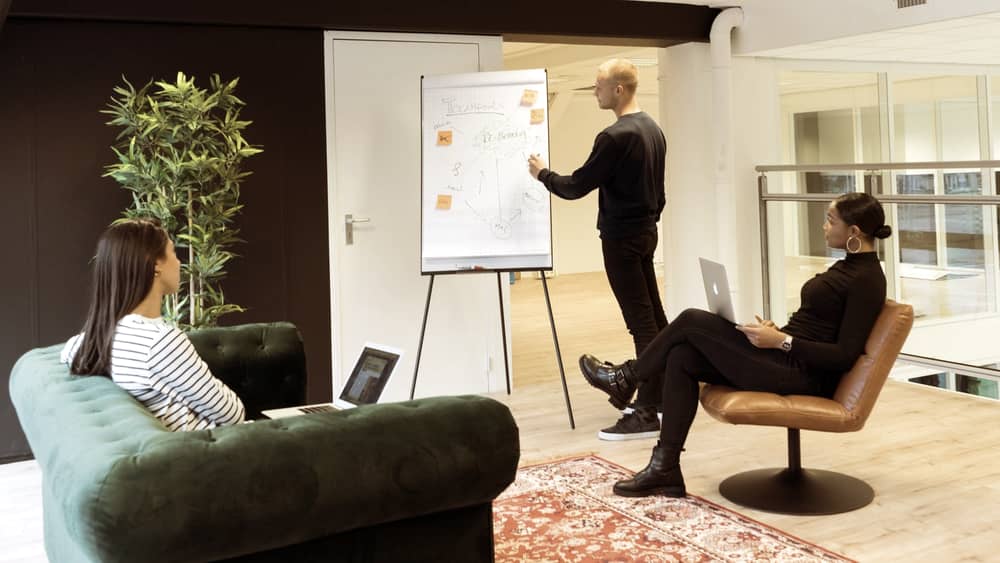
We spent the first hour not talking about software at all. Each person walked us through their week on the whiteboard. The teacher's week was dominated by paper-setting and marking. The centre manager's week was attendance registers, timetable clashes and phone calls. The fees coordinator kept a ledger, a spreadsheet and a WhatsApp chat per family, and none of the three agreed with each other.
Then we asked the question that reframed the project: "If this worked perfectly a year from now, what would be different on a Monday morning?" The answers were specific. Teachers would walk in with papers already made. Students who missed class would have watched it the night before. The manager would know which batches were slipping before the monthly test told him. Parents would stop calling.
That list became our north star. It was not "an app"; it was four connected products — for students, teachers, parents and the business — sharing one data model.
- Four user groups: students, teachers, parents, centre and business admins
- One measurable goal per group, written in their own words
- A list of every tool they currently used: WhatsApp, Excel, a paper ledger, photocopiers
- Agreement to spend two weeks in the centres before any design
Two weeks inside the centres
Discovery is where most of the real requirements hide, so we went to them. Our designer and engagement lead spent two weeks across three centres of different sizes: sitting in classes, watching teachers set papers, and — with parents' permission — interviewing students about how they studied at home.
Three findings changed the design. First, a large share of students shared a phone with a sibling or parent, and many had it only in the evening. Anything that needed a live connection at a fixed time would fail them. Second, most students were far more comfortable reading explanations in Hindi, even when the exam itself was in English. Third, teachers did not want AI to write their papers for them — they wanted a first draft they could fix in ten minutes, in their own style, with questions they trusted.
We also found things we had not been told about: a centre that ran two batches in one room with a partition, a teacher who kept her best questions in a notebook she would not share, and a fee structure with seven different instalment plans.

What we decided not to build
The founder's original wish list had more than sixty items. A product that tries to do sixty things in its first release usually does none of them well, so we ran a prioritisation session where every feature had to answer one question: which Monday-morning goal does this move?
Some ideas were cut outright — a social feed for students, a built-in chat between students, and a custom video-conferencing system (we integrated an existing one instead). Others were deferred to a second phase, including a full content marketplace and AI-generated video lessons. What remained was thirty features that each traced back to a goal someone had said out loud in that first workshop.
- Student social feed: moderation burden with no learning benefit
- In-app student chat: safeguarding risk for minors
- Custom video calling: integrated an existing provider instead
- AI-generated video lessons: deferred until the core was proven
Designing for three very different users
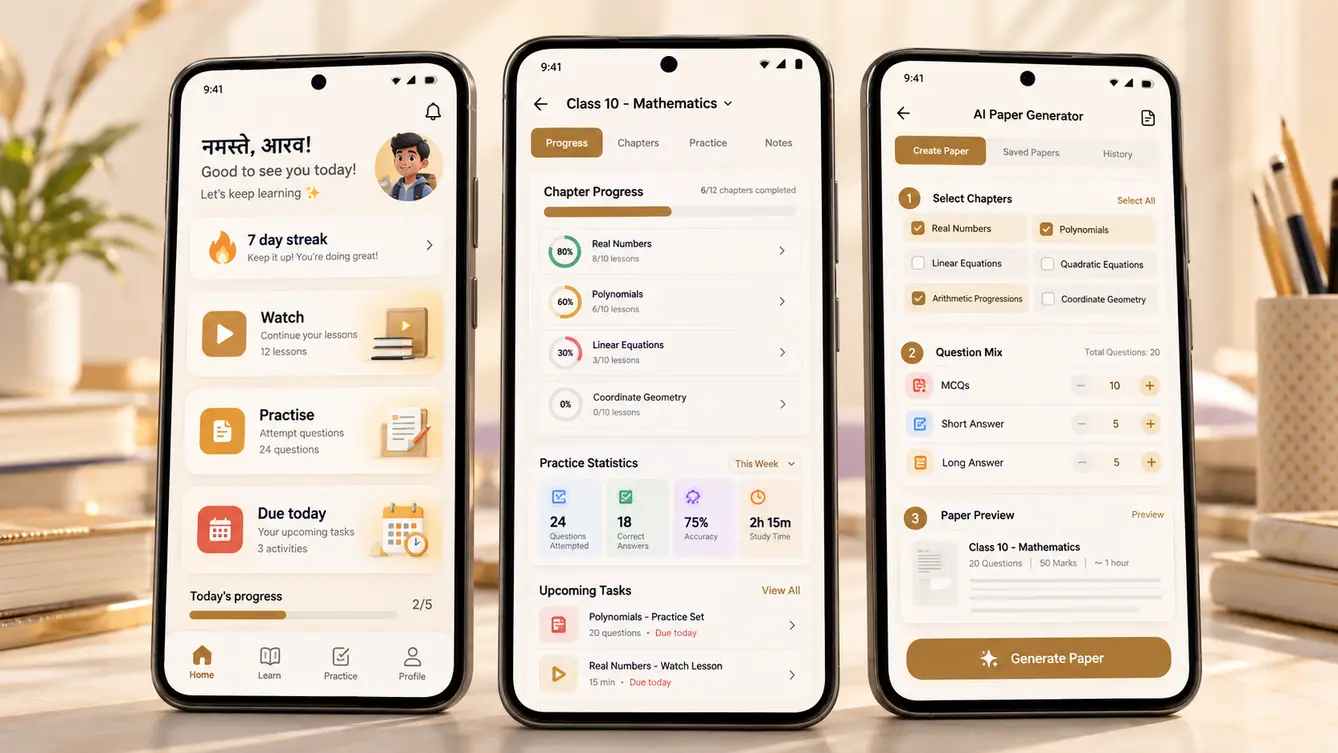
We designed the student app first, because it had the hardest constraints. Our designer set a rule: every core screen had to work on a budget Android phone, in Hindi, with one thumb, on a patchy connection. That ruled out heavy animations and dense dashboards, and it pushed us towards a single "Today" screen — what to watch, what to practise and what is due — instead of a menu of modules.
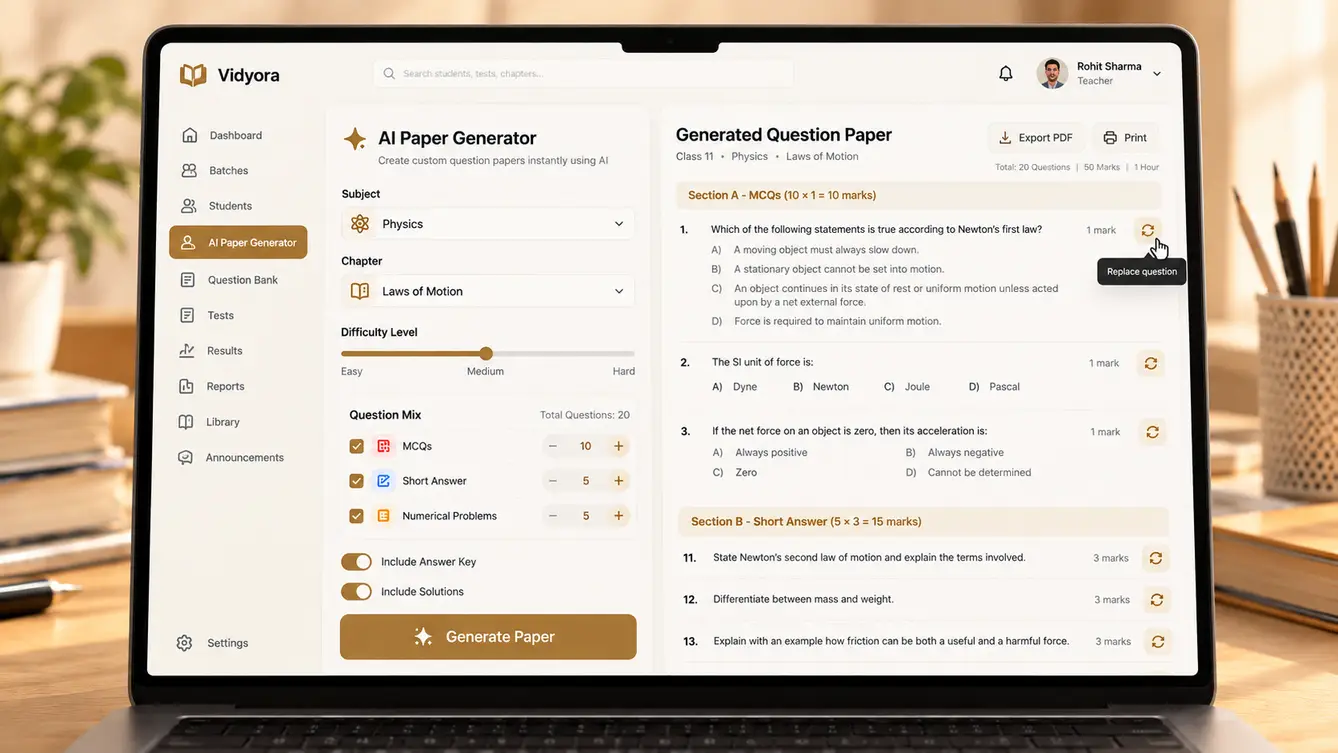
The teacher dashboard went the other way. Teachers used it on a laptop or a centre desktop, often while preparing for class, so it could be information-dense. The centrepiece became the paper generator: pick the chapter, difficulty and question mix, get a draft paper, then edit, reorder or swap any question before exporting.
Parents got the simplest product of all. Most parents did not want another app, so we made WhatsApp the primary channel: a weekly progress summary, test results and fee reminders, with the parent app there for those who wanted more detail.
We tested clickable prototypes with students and teachers at two centres before writing production code. Two rounds of testing changed a lot: the student home screen lost half its buttons, and the paper generator gained a "replace this question" action that teachers used constantly.
The team we put together
We staffed Vidyora as one team rather than separate design, web, mobile and AI groups handing work to each other. Everyone joined the same weekly demo with the client, and the AI engineer sat in the teacher-dashboard stand-ups, because the paper generator was as much a UX problem as a model problem.
Owned scope, weekly demos and the client relationship; ran the on-site pilot.
Discovery, wireframes, prototypes and the design system for all four apps.
React Native student and parent apps, offline sync and downloads.
Next.js teacher dashboard and multi-centre admin console.
APIs, multi-tenant data model, fees, attendance and integrations.
Paper generation, answer-sheet evaluation, doubt assistant and the evaluation harness.
Device testing on budget Android phones, regression suites and pilot support.
10 people in total, working as one team.

Six decisions that shaped the product
Every project has a handful of decisions that are expensive to reverse. We wrote each one down with the options we considered and why we chose what we did, and shared them with the client before committing. These were Vidyora's.
Cross-platform or native apps?
- Separate native Android and iOS apps
- React Native with native modules where needed
- A mobile website only
Our call: React Native with native modules where needed. One codebase for the student and parent apps, shared logic with the web dashboard, and native modules only for downloads and camera capture. A mobile website could not deliver reliable offline lessons.
Fine-tune a model or build around existing ones?
- Fine-tune an open-weight model on past papers
- Use frontier LLM APIs with retrieval and an evaluation set
Our call: Use frontier LLM APIs with retrieval and an evaluation set. Grounding generation in the centres' own questions kept papers in the teachers' style, and an evaluation set let us swap models later without guessing. Fine-tuning would have cost more and locked us in early.
How far to trust AI answer-sheet evaluation?
- Fully automatic marking
- AI suggests marks, teacher reviews everything
- AI marks confident answers, flags uncertain ones for the teacher
Our call: AI marks confident answers, flags uncertain ones for the teacher. Automatic marking of handwriting is not reliable enough to trust blindly, but reviewing every answer would have saved no time. Sending only low-confidence answers to teachers kept them in control while removing most of the work.
Online-first or offline-first student app?
- Stream everything, cache a little
- Offline-first with background sync
Our call: Offline-first with background sync. Many students had a phone only in the evening, often on weak data. Downloaded lessons, queued test submissions and sync-when-possible made the app usable for the students who needed it most.
One database per centre, or one shared platform?
- Separate deployment per centre
- One multi-tenant platform with row-level security
Our call: One multi-tenant platform with row-level security. Leadership needed a single view across centres while teachers must only see their own batches. Row-level security in PostgreSQL enforced that at the database, the same pattern we used for HyperWork.
How should parents hear from the centre?
- SMS
- Parent app only
- WhatsApp first, app for detail
Our call: WhatsApp first, app for detail. Parents already lived in WhatsApp and rarely checked email. Weekly summaries and fee reminders went there, with the parent app for anyone who wanted the full picture.
The 30 features, module by module
Here is everything that shipped in the first full release, grouped the way the product is organised. Each feature traces back to one of the Monday-morning goals from the first workshop.
- 01AI question-paper generator
Draft a full paper from chapter, difficulty and question mix, grounded in the centre's own question bank.
- 02Answer keys and worked solutions
Step-by-step solutions generated with every paper, editable before release.
- 03Handwritten answer-sheet evaluation
Scan answer sheets; the AI marks confident answers and flags uncertain ones for the teacher.
- 04Doubt-solving assistant
Students ask questions in Hindi or English and get answers drawn only from course material.
- 05Lesson-plan drafts
A starting lesson plan per chapter that teachers adapt to their own style.
- 06Course and batch builder
Organise chapters, lessons and materials per batch, reusable across centres.
- 07Offline lesson downloads
Download videos and notes on Wi-Fi, watch later without data.
- 08Live classes with recordings
Integrated live sessions, automatically recorded and added to the batch.
- 09Adaptive practice
Practice questions that get harder or easier based on each student's answers.
- 10Bilingual content
Hindi and English side by side for explanations, questions and the interface.
- 11Online tests
Timed tests with negative marking and section rules that mirror real exams.
- 12Tagged question bank
Every question tagged by chapter, topic, difficulty and exam pattern.
- 13OMR sheet upload
Photograph OMR sheets from a phone and get scores without a scanner.
- 14Instant results and rank lists
Results, percentiles and batch ranks published the moment a test closes.
- 15Chapter-wise weakness report
Shows each student and teacher exactly which topics are slipping.
- 16"Today" home screen
What to watch, practise and submit today — nothing more.
- 17Streaks and milestones
Light gamification that rewards consistent daily study.
- 18Parent app and reports
Attendance, test results and progress trends for each child.
- 19QR attendance
Students scan in at the centre; parents are notified automatically.
- 20WhatsApp notifications
Weekly summaries, results and reminders on the channel parents already use.
- 21Teacher dashboard
Batches, homework, tests and weak topics in a single view.
- 22Timetable and scheduling
Batch, room and teacher scheduling with clash detection.
- 23Homework tracking
Assign, collect and review homework with submission status per student.
- 24Multi-centre admin console
Leadership sees every centre; managers see their own.
- 25Role-based access
Separate permissions for owners, managers, teachers, students and parents.
- 26Fees with UPI and instalments
Instalment plans, discounts and scholarships, collected over UPI with automatic receipts.
- 27Admissions and enquiry CRM
Track enquiries from first call to admission, with follow-up reminders.
- 28Analytics dashboard
Enrolment, attendance, results and collections across centres.
- 29Protected content library
Notes and PDFs that students can read in-app but not forward.
- 30Audit logs and data export
Every change recorded, and all data exportable — the client owns it.
How the build ran
We built in two-week sprints with a demo to the client at the end of each one — on real phones, not slides. The AI features were built alongside an evaluation set of real papers and answer sheets from the centres, so every change to prompts or models was scored before it reached a teacher.
The hardest part was not the AI. It was the fee module: seven instalment plans, sibling discounts, scholarships and part-payments that had to reconcile exactly with the fees coordinator's ledger. We imported two years of history and did not go live until the numbers matched to the rupee.
- Weeks 1–2Discovery
Workshop, two weeks across three centres, prioritised feature list.
- Weeks 3–5UX and prototypes
Wireframes, clickable prototypes, two rounds of testing with students and teachers.
- Weeks 6–15Build
Five sprints with demos on real phones; evaluation set built alongside the AI features.
- Weeks 16–18Pilot
One centre live, engagement lead on site, fixes shipped weekly.
- Weeks 19–26Rollout
Remaining centres in two waves, each with teacher and manager training.
Launch: one centre, then three, then all of them
We did not launch everywhere at once. Vidyora went live first at a single centre for three weeks, with our engagement lead on site for the first days and a daily check-in after that. Teachers generated their first AI papers under supervision, and we watched how students actually used the app in the evenings.
The pilot surfaced problems no prototype could: a batch of phones with so little storage that offline downloads failed, a teacher who needed Sanskrit characters in questions, and a parent notification that went out at 6 a.m. Each was fixed before the next wave. The remaining centres were rolled out in two waves over the following weeks, each with a half-day training session for teachers and managers.
What we learned
Teachers adopt AI when it respects their judgement. The paper generator succeeded because it produced a draft the teacher owned, not a finished paper they had to trust blindly. The answer-sheet evaluator succeeded because it showed its confidence and sent uncertain answers to the teacher instead of guessing.
Offline is not an edge case. For many students, offline was the main way they used the app, and designing for it first made the whole product faster for everyone.
Finally, the unglamorous modules — fees, attendance, timetables — are what made the platform indispensable to the business. The AI got people talking; the operations modules made sure nobody wanted to go back to the old way.
- React Native
- Next.js
- Node.js / NestJS
- PostgreSQL
- LLM APIs with evaluation harness
- Handwriting OCR
- AWS Mumbai
- WhatsApp Business API
