
TadkaOS: running eight brands out of six kitchens without losing track of a single order
A cloud-kitchen operator ran several food brands from shared kitchens, with orders arriving on multiple aggregator tablets and its own website. Orders were missed at peak, ingredients ran out mid-service and nobody knew which brand actually made money. We built TadkaOS: one order hub, a kitchen display system, recipe-level inventory, demand forecasting and brand profitability — 25 features built for the dinner rush.
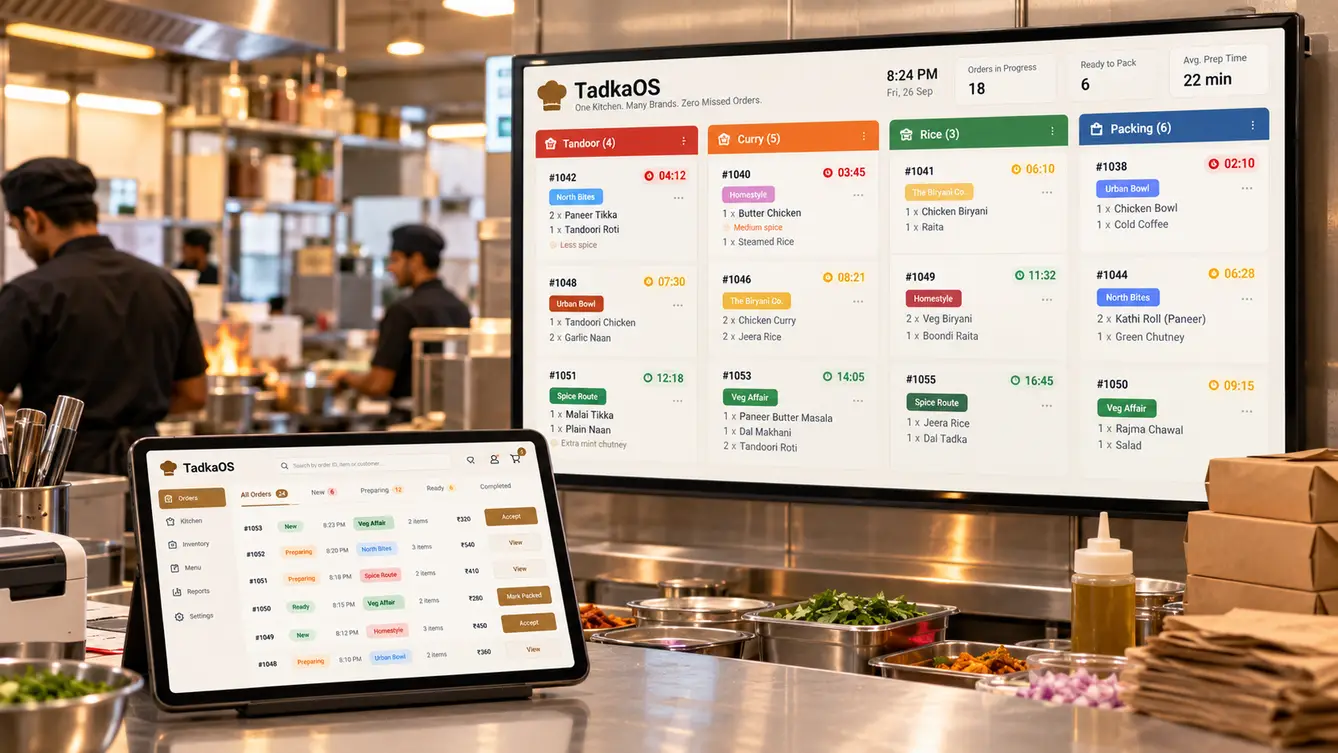
Six tablets beeping at once
On a Friday night in TadkaOS's busiest kitchen, the order counter had six tablets: one per aggregator per brand group, plus the brand's own website orders printed on a thermal printer. Each tablet beeped differently. At peak, an order could sit unaccepted for minutes because the person nearest was busy with another tablet — and missed orders meant cancellations, penalties and ratings that hurt every brand in the kitchen.
Behind the counter, cooks worked from printed tickets that did not show which brand an order belonged to until they read the packaging instructions. Stock ran out mid-service because nobody knew how much of a base gravy eight brands were drawing on.
“We built eight brands. We never built the kitchen that runs them.”
Watching the dinner rush
We spent three evenings in two kitchens, timing orders from arrival to dispatch. The delays clustered at predictable points: accepting the order, figuring out which station needed to start first, and assembling multi-brand orders for the same rider. Ingredient shortages were almost always base preparations shared across brands, which nobody tracked below the level of finished dishes.
- Orders sitting unaccepted on one of six tablets
- No station-level view of what to start first
- Shared base preparations running out unexpectedly
- No brand-level view of cost and profit

One order hub, one kitchen screen
TadkaOS pulls orders from every aggregator and the website into one hub that auto-accepts within the kitchen's rules. Each order is broken into station tasks and shown on kitchen display screens, sequenced so that the longest-cooking items start first and everything finishes together.
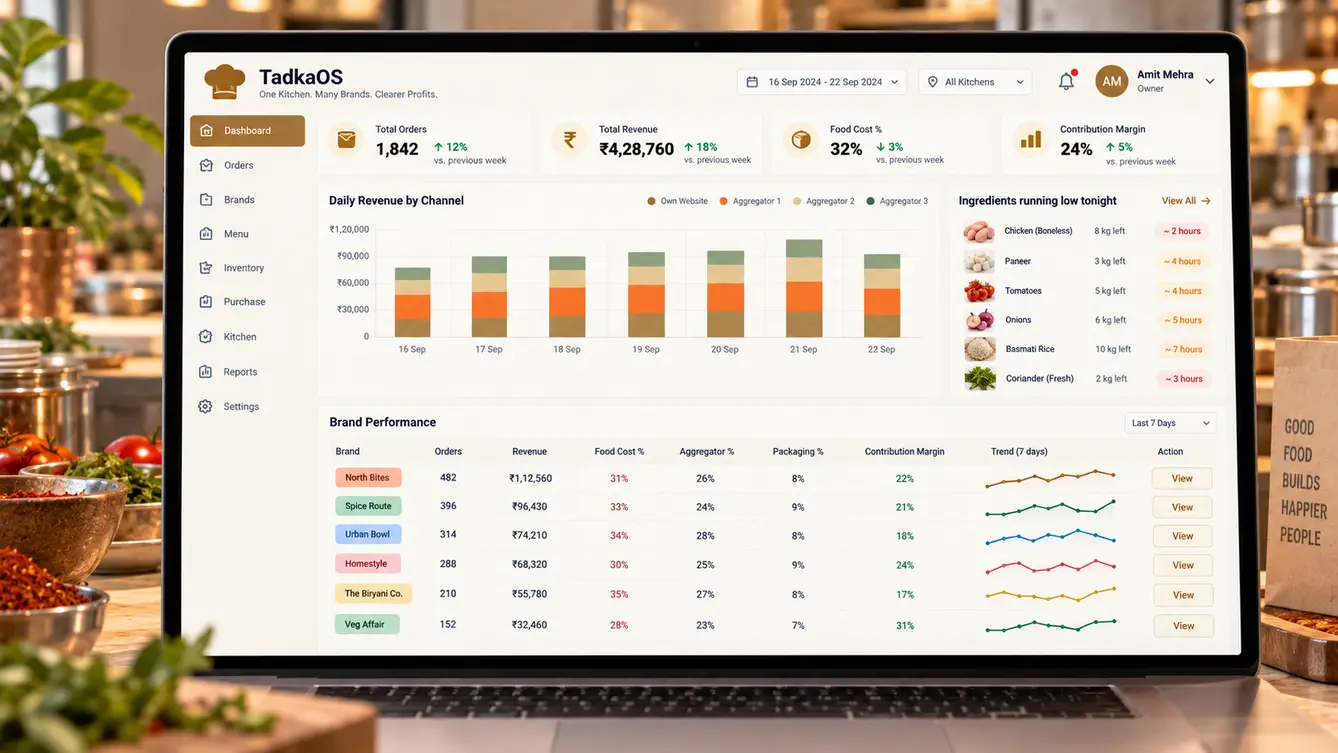
Recipes are modelled down to base preparations and raw ingredients. Every order depletes inventory at that level, so the kitchen sees, mid-service, that tonight's makhani base will run out in forty minutes — while there is still time to prepare more.
The team
Real-time reliability was critical, so the backend team included an engineer focused solely on aggregator integrations and failover.
Kitchen observation, rollout and weekend support.
Kitchen display, order hub and management console.
Kitchen screens, order hub and console.
Real-time order routing, recipes and inventory.
Aggregator and website order integrations with failover.
Demand forecasting for prep planning.
8 people in total, working as one team.
Decisions we made
These were agreed with the founder and the head chef, whose kitchen it had to work in.
Keep aggregator tablets or unify?
- Keep separate tablets
- One order hub integrating every channel
Our call: One order hub integrating every channel. Multiple tablets were the main cause of missed orders. A single hub with auto-accept rules removed that failure point.
Printed tickets or kitchen display screens?
- Improved printed tickets
- Station-based kitchen display screens
Our call: Station-based kitchen display screens. Screens could sequence tasks by cooking time, show brand and packaging clearly, and flag late orders — none of which paper could do.
Track inventory by dish or by ingredient?
- Finished dishes
- Base preparations and raw ingredients
Our call: Base preparations and raw ingredients. Shortages happened at the level of shared bases. Only recipe-level tracking could predict them.
What if an integration fails mid-rush?
- Show an error
- Automatic fallback alerts and manual order entry
Our call: Automatic fallback alerts and manual order entry. A silent integration failure at peak is the worst case. Monitoring detects missing orders and prompts staff to switch to fallback immediately.
The 25 features
Everything that shipped across the counter, the kitchen and management.
- 01Unified order intake
Aggregator and website orders in one queue.
- 02Auto-accept rules
Orders accepted automatically within capacity.
- 03Item availability toggles
Switch dishes off across all channels at once.
- 04Rider handover
Orders grouped and ready for pickup by rider.
- 05Integration health monitoring
Alerts when a channel stops sending orders.
- 06Station routing
Items sent to tandoor, curry, rice and packing stations.
- 07Cook-time sequencing
Longer items start first so orders finish together.
- 08Late order alerts
Timers turn amber and red as orders run late.
- 09Brand packaging cues
Clear brand tags and packaging instructions.
- 10Bump and recall
Mark items done and recall them if needed.
- 11Recipe modelling
Dishes built from base preparations and raw ingredients.
- 12Real-time depletion
Stock reduced with every order.
- 13Run-out predictions
Warnings before bases run out during service.
- 14Prep planning
Forecast-based prep quantities for each shift.
- 15Wastage logging
Wastage recorded with reasons.
- 16Brand profitability
Food cost, commissions, packaging and margin by brand.
- 17Channel analytics
Orders and revenue by aggregator and website.
- 18Kitchen performance
Prep times and late orders by kitchen and station.
- 19Demand forecasting
Expected orders by brand, kitchen and hour.
- 20Purchase orders
Supplier orders suggested from forecasts.
- 21Menu engineering
Dish popularity versus margin.
- 22Role-based access
Permissions for kitchen staff, managers and owners.
- 23Multi-kitchen console
All kitchens and brands in one view.
- 24Audit trail
Price, menu and stock changes recorded.
- 25Accounting export
Daily sales and purchases to accounts.
Rollout
We launched in the busiest kitchen first, on a Tuesday, with our engineers in the kitchen through the first weekend rush. The old tablets stayed switched on for a week as a fallback and were then unplugged. Recipe data was the slowest part of rollout: the head chef and our team weighed and documented base preparations for every dish.
- Weeks 1–2Discovery
Three dinner rushes timed in two kitchens.
- Weeks 3–4Design
Order hub and kitchen display tested with chefs.
- Weeks 5–11Build
Integrations, kitchen screens, recipes and inventory.
- Weeks 12–14Pilot kitchen
Busiest kitchen live with weekend support.
- Weeks 15–16All kitchens
Recipes documented; remaining kitchens launched.
What we learned
Build for the busiest hour. Every design choice was tested against Friday dinner, not a quiet afternoon.
Model the recipe, not the menu. Tracking base preparations shared across brands was what finally stopped mid-service shortages.
- Next.js
- React Native
- NestJS
- PostgreSQL
- WebSockets for real-time orders
- Aggregator integrations
- Demand forecasting model
- AWS Mumbai
