
TableTap: QR ordering that made a busy restaurant chain faster without making it feel impersonal
A casual-dining chain's weekend rush meant guests waited to order, waited for the bill and waited to pay. We built TableTap: QR menus with ordering from the table, orders straight to the kitchen, split bills and UPI payments at the table, a POS for staff and guest insights — while keeping servers at the heart of hospitality.
Waiting to order, waiting to pay
TableTap's operations head timed a Saturday night. Guests waited to get a server's attention, waited for the order to be keyed into the POS, and at the end waited again for the bill and a card machine. Groups splitting bills made it worse. Tables turned slowly while a queue formed at the door.
“Our food is fast. Everything around it is slow.”
Keeping hospitality human
The chain did not want to replace servers. Guests valued recommendations and warmth. We designed TableTap so guests could order and pay when they wanted, while servers were freed from order-taking to spend time recommending, checking on tables and handling special requests.
- Order more without waiting for a server
- Split bills without awkward maths
- Pay at the table with UPI
- Servers free to recommend and look after guests
No app to install
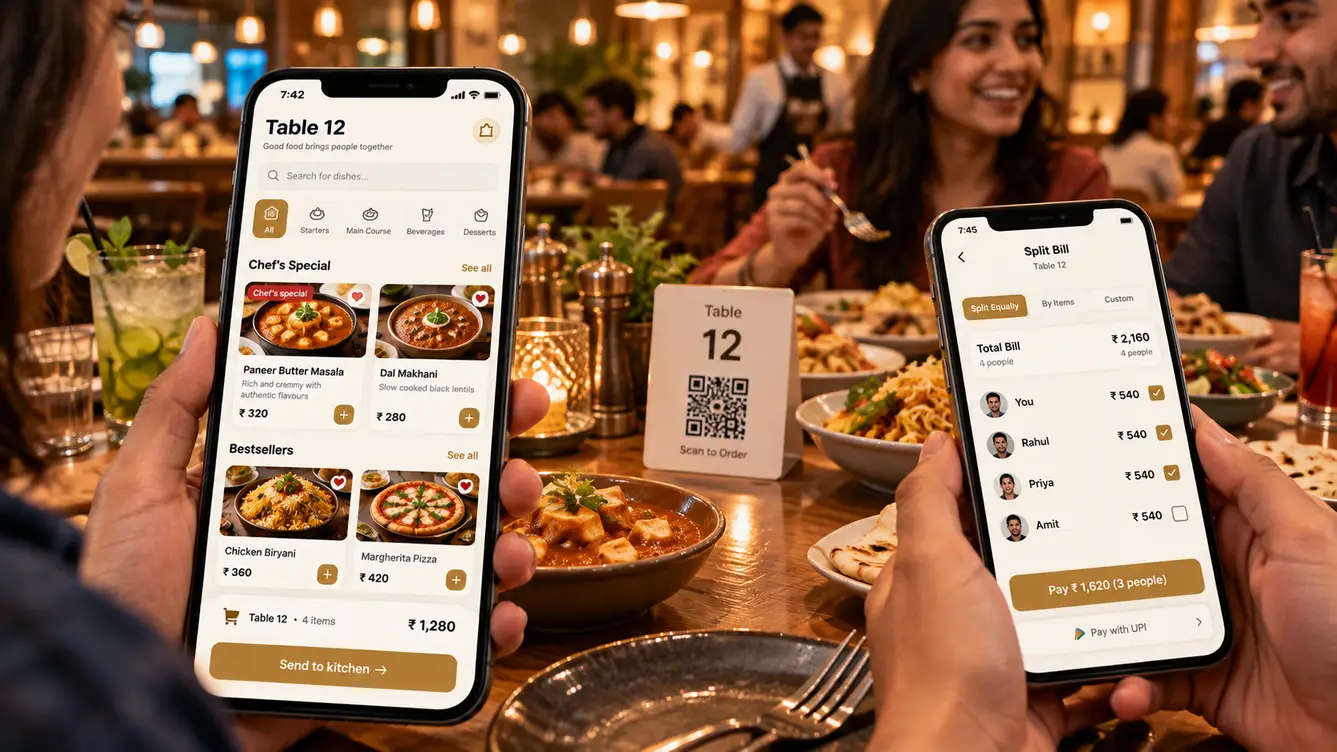
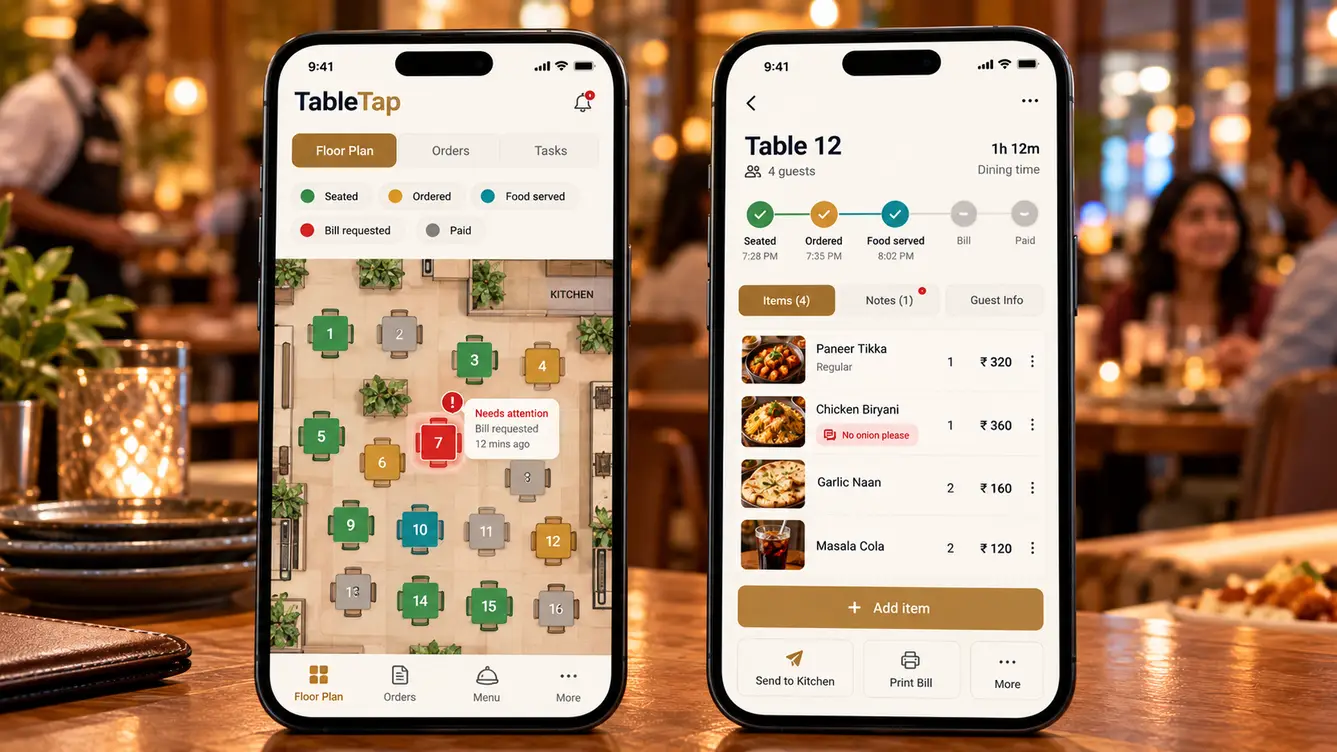
Guests scan a table QR code and a fast web menu opens — no app download. Orders go straight to the kitchen display and the server's app, tagged by table. Guests can add items through the meal, split the bill by item or equally, and pay by UPI or card. Servers see every table's status and can take orders on their app for guests who prefer to talk.
The team
A small team optimising for speed on guests' phones and reliability in the kitchen.
Outlet observation and pilot.
Guest menu, split bill and server app.
Ordering, POS, kitchen display and payments.
Server app.
5 people in total, working as one team.
Decisions we made
Agreed with the operations head and outlet managers.
Native app or web menu?
- Guest app download
- Web menu from QR code
Our call: Web menu from QR code. Guests will not install an app for one meal; the web opened instantly.
Replace servers?
- Self-service only
- Self-service plus servers with a floor view
Our call: Self-service plus servers with a floor view. Hospitality was the brand. Servers moved from order-taking to looking after guests.
Pay at the table?
- Pay at the counter
- Pay and split at the table
Our call: Pay and split at the table. Paying at the table removed the longest wait at the end of the meal.
Every feature, module by module
Everything that shipped for guests, servers, the kitchen and managers.
- 01QR web menu
Fast menu with photos, no download.
- 02Ordering from the table
Order and add items anytime.
- 03Dietary filters
Veg, vegan, spice and allergens.
- 04Split bills
By item or equally.
- 05UPI and card payment
Pay at the table.
- 06Feedback
Quick ratings after payment.
- 07Floor view
Every table's status at a glance.
- 08Assisted ordering
Take orders on the server app.
- 09Special requests
Notes sent to the kitchen.
- 10Attention alerts
Tables that need a server.
- 11Kitchen display
Tickets by station with timers.
- 12Printer support
Tickets for stations that prefer paper.
- 13Item availability
Mark dishes sold out instantly.
- 14POS and billing
GST bills and payment reconciliation.
- 15Menu management
Prices, photos and specials across outlets.
- 16Table turn analytics
Turn times by day and hour.
- 17Sales dashboard
Sales by outlet, dish and hour.
- 18Guest insights
Repeat guests and favourite dishes.
- 19Role-based access
Servers, kitchen, managers and head office.
Rollout
One outlet piloted TableTap over two weekends. Servers shaped the floor view; the kitchen shaped ticket layouts. The remaining outlets followed after the pilot showed faster table turns on the busiest nights.
- Weeks 1–2Discovery
A Saturday night timed at two outlets.
- Weeks 3–4Design
Guest menu and floor view prototyped.
- Weeks 5–10Build
Ordering, payments, POS and kitchen display.
- Weeks 11–12Pilot outlet
Two weekends of real service.
- Weeks 13–14All outlets
Chain-wide rollout.
What we learned
No-download matters. A web menu from a QR code removed the biggest barrier.
Technology should free people for hospitality, not replace it.
- Next.js
- React Native
- NestJS
- PostgreSQL
- Real-time order sync
- UPI and card payments
- Kitchen printer integration
- AWS Mumbai
