
StoreSutra: giving a 40-store apparel chain one version of the truth about its stock
An apparel retail chain across forty stores could not say, with confidence, how many of any item it had or where. Stores ran out of bestsellers while the warehouse held stock, and slow sizes piled up at the wrong branches. We built StoreSutra: real-time inventory, store-to-store transfers, AI replenishment, a fast POS and a loyalty app — 26 features that put the right stock in the right store.
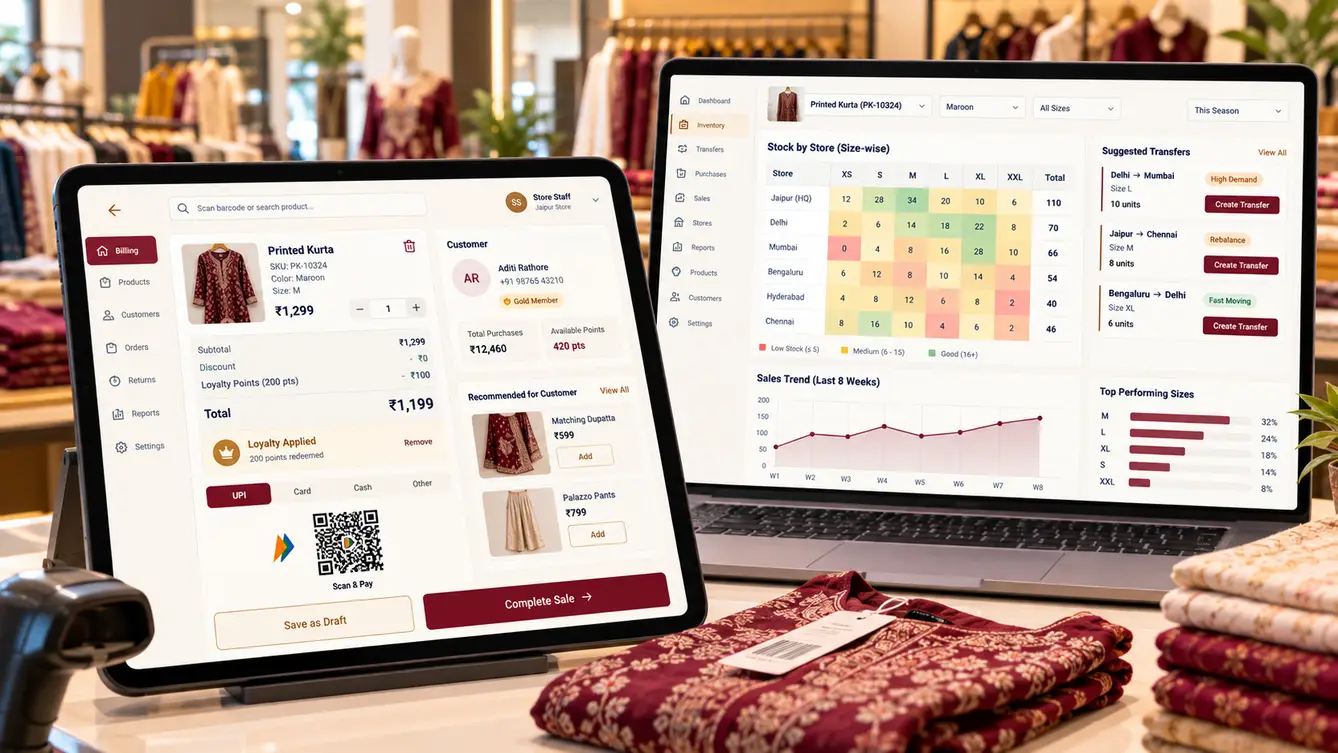
The morning phone calls
Every morning, StoreSutra's merchandising team started with phone calls. Store managers called the warehouse asking for bestsellers; the warehouse called stores asking what they had; the merchandising head called everyone asking why a new collection was selling out in some cities and sitting untouched in others.
The chain's billing software recorded sales, but stock figures drifted from reality within weeks: unrecorded transfers, returns processed in the wrong store, damaged items never written off. Nobody trusted the numbers enough to act on them, so everyone called instead.
“We don't have a stock problem. We have a 'where is the stock' problem.”
Store visits and a stock count
We visited stores in three cities and ran a physical count of one popular style across them. The system's numbers were off in almost every store — in both directions. The causes were mundane: transfers sent without being received in the system, exchanges recorded as new sales, stock moved to the back room and forgotten.
We also watched the billing counter during a festive rush. Billing was slow, loyalty was handled on paper cards, and staff had no way to check another store's stock for a customer who wanted a different size.
- Transfers dispatched but never received in the system
- Exchanges recorded as fresh sales
- Damaged and lost items never written off
- No way to look up another store's stock

A stock ledger, not a stock number
The key design decision was to stop storing "how many we have" and start recording every movement: received, sold, returned, transferred out, transferred in, adjusted. Stock on hand is calculated from the ledger, so every number can be explained and every discrepancy traced to a specific movement.
Transfers became two-sided: a transfer is not complete until the receiving store scans it in. Anything in transit is visible as in transit, not lost.
The team
With forty stores depending on the POS during peak season, we staffed QA and on-site rollout support heavily.
Merchandising workshops, rollout waves and store support.
POS speed, staff app and head-office console.
POS and head-office console.
Store staff app and loyalty app.
Stock ledger, transfers, pricing and integrations.
Demand forecasting and replenishment.
Peak-load billing tests and stock reconciliation checks.
9 people in total, working as one team.
Decisions we made
These were agreed with the merchandising head, operations and finance.
Store a stock count or a movement ledger?
- Update a stock quantity per item
- Record every movement; derive stock from the ledger
Our call: Record every movement; derive stock from the ledger. A ledger makes every number explainable and every discrepancy traceable, which was exactly what the chain had lacked.
One-sided or two-sided transfers?
- Transfer complete when dispatched
- Complete only when the receiving store scans it in
Our call: Complete only when the receiving store scans it in. Most stock drift came from unreceived transfers. Two-sided transfers made in-transit stock visible and accountable.
Should the model place orders automatically?
- Automatic transfers and orders
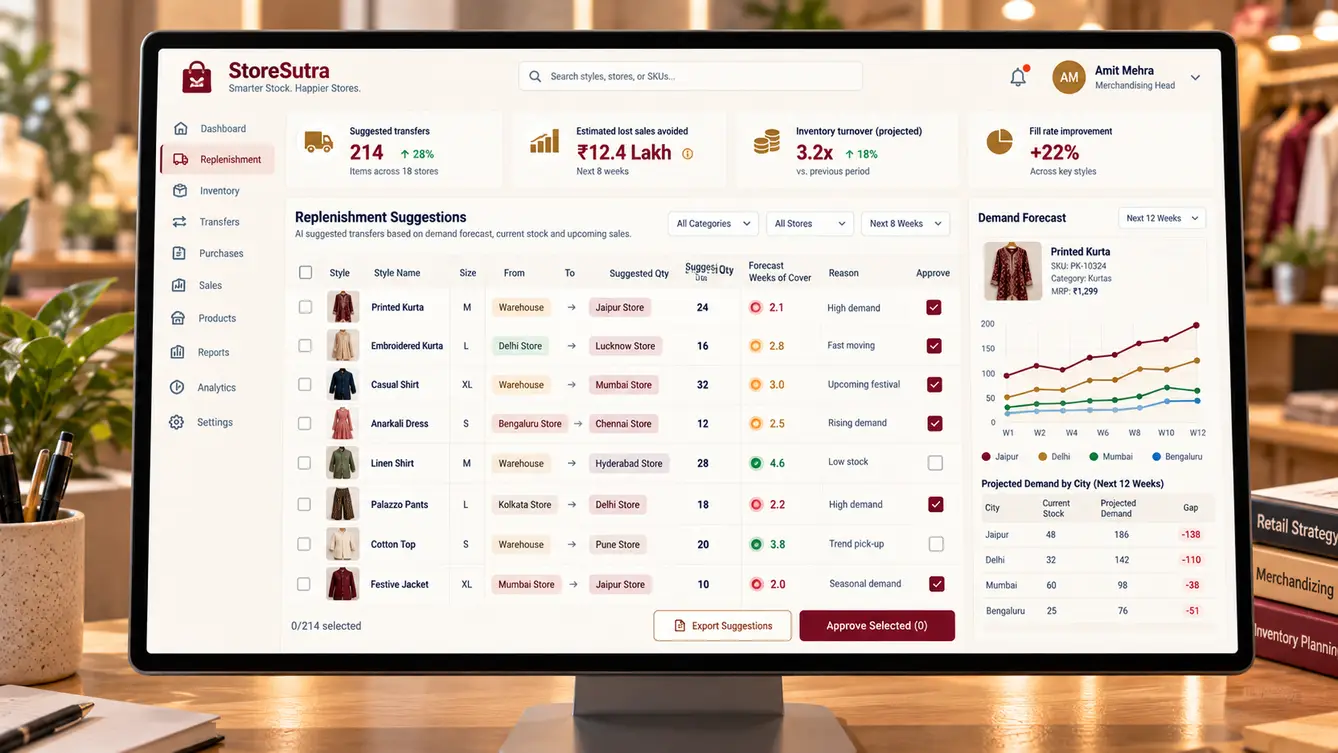
- Suggestions approved by merchandisers
Our call: Suggestions approved by merchandisers. Merchandisers understood fashion trends and local events the model could not. Approval kept them in control and improved the model through their edits.
Cloud-only POS or offline-capable?
- Cloud-only billing
- Offline-capable POS that syncs
Our call: Offline-capable POS that syncs. Store internet failures during a festive rush would stop sales. Offline billing kept tills running and synced when connectivity returned.
The 26 features
Everything that shipped across stores, head office and customers.
- 01Fast barcode billing
Scan, bill and pay in seconds.
- 02Offline billing
Tills keep working without internet.
- 03Exchanges and returns
Recorded correctly against the original sale.
- 04UPI and card payments
Integrated payments with instant confirmation.
- 05Loyalty at the counter
Earn and redeem by phone number.
- 06Movement ledger
Every receipt, sale, return, transfer and adjustment.
- 07Two-sided transfers
Dispatch and receive, with in-transit tracking.
- 08Cycle counts
Scheduled partial counts with variance reports.
- 09Damage and write-offs
Recorded with reasons and approvals.
- 10Size-by-store matrix
Stock for each style by size and store.
- 11Stock lookup across stores
Find a size in another store for a customer.
- 12Receive transfers
Scan incoming stock against the transfer.
- 13Store tasks
Visual merchandising and count tasks from head office.
- 14Hold for customer
Reserve an item at another store.
- 15Demand forecasting
Forecasts by style, size and store.
- 16Replenishment suggestions
Transfers and orders suggested for approval.
- 17Sell-through reports
Performance by collection, style and city.
- 18Pricing and promotions
Markdowns and offers pushed to all stores.
- 19Supplier purchase orders
Orders and receipts against suppliers.
- 20Loyalty app
Points, offers and purchase history for customers.
- 21Customer profiles
Purchase history across all stores.
- 22Role-based access
Permissions for cashiers, managers and head office.
- 23Audit trail
Every price change and stock adjustment recorded.
- 24Accounting integration
Daily sales and stock values to accounts.
- 25Management dashboard
Sales, stock and margin across the chain.
- 26GST-compliant invoicing
Tax invoices with correct HSN codes and rates.
Rolling out between seasons
We rolled out between seasons, starting with a full stock count in each store so the ledger began from verified numbers. Five stores went live first, then the rest in weekly waves, each with a team member on site for the first two days.
The replenishment model ran in suggestion mode for the first weeks: merchandisers approved or edited every transfer, and their edits fed back into the model.
- Weeks 1–3Discovery
Store visits in three cities and a physical count of one style.
- Weeks 4–6Design
Ledger model, POS and transfer flows prototyped.
- Weeks 7–16Build
POS, inventory, staff app, console, loyalty and forecasting.
- Weeks 17–18Five-store pilot
Stores launched from verified counts.
- Weeks 19–22All stores
Weekly waves with on-site support.
What we learned
Accurate data beats clever forecasting. The ledger and two-sided transfers fixed more lost sales than the model did; the model then made good data more useful.
Start from a verified count. Launching each store from a physical count meant staff trusted the system from day one.
- Next.js
- React Native
- NestJS
- PostgreSQL
- Event-driven stock ledger
- Demand forecasting model
- Barcode and RFID-ready scanning
- AWS Mumbai
