
PravaasOS: how an immigration consultancy stopped losing files in WhatsApp and started telling applicants the truth about their status
A multi-branch study-abroad and immigration consultancy was running thousands of applications through spreadsheets, shared drives and counsellors' phones. We built PravaasOS: a case management system, an applicant app, AI document checks and a counsellor workspace — 25 features that turned every application into a tracked, auditable file.
A lost passport scan and a missed intake
PravaasOS's director told us the story that convinced her to rebuild the business's operations. A student's passport scan had been sent to a counsellor on WhatsApp, forwarded to a documentation executive, and then lost when that executive changed phones. The student's application missed the university's deadline and the whole intake was lost.
The consultancy had grown to several branches across the Tricity and nearby towns. Each counsellor ran their own spreadsheet, documents lived in shared drives with inconsistent folder names, and applicants — anxious about the biggest decision of their lives — called several times a week to ask where things stood.
“Every applicant's future sits in a file. We were keeping those files in WhatsApp.”
Following applications through a branch
We spent a week across two branches. A typical application passed through a counsellor, a documentation executive, an application filer and sometimes a finance executive for loans and fee payments. Each hand-off was a WhatsApp message or a verbal instruction.
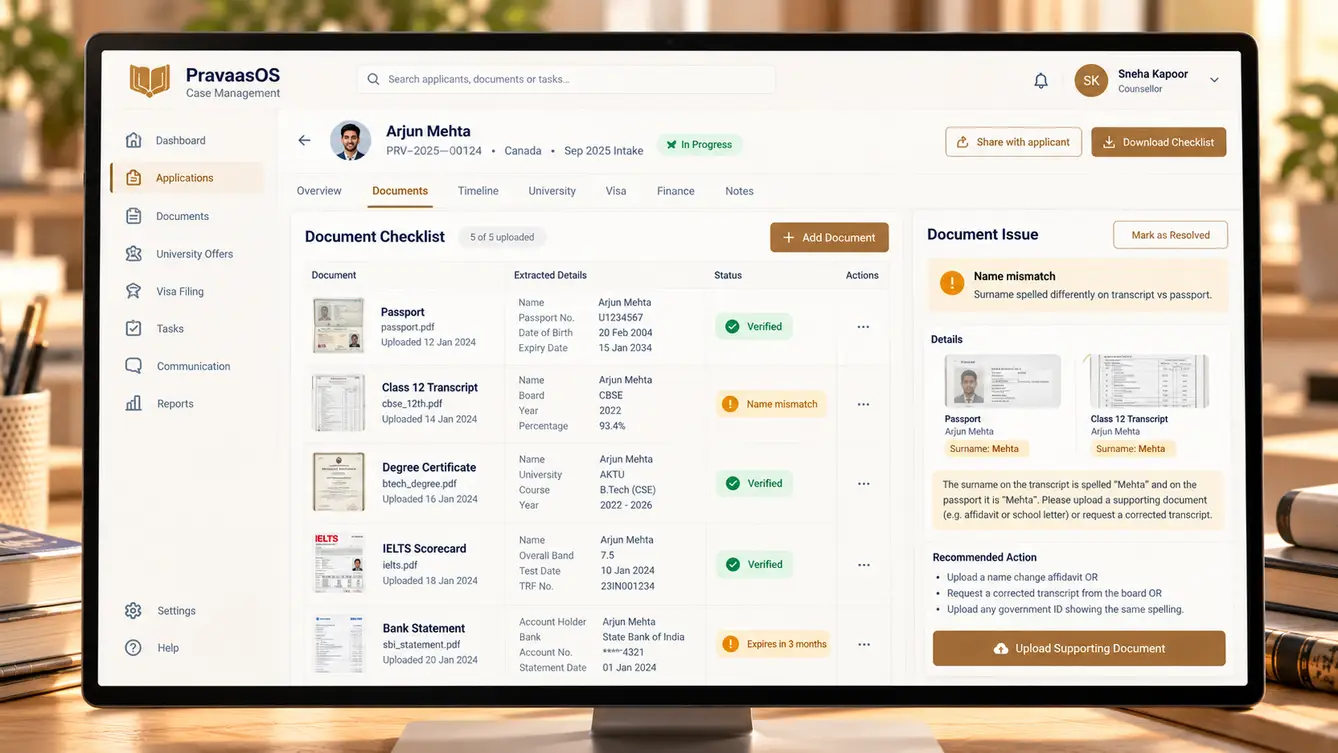
The busiest periods — just before university intake deadlines — were when mistakes clustered. Documents with expired validity, mismatched names between passport and transcripts, and missing financial proofs were caught late, often by the university or the visa office rather than by the consultancy.
- Documents lost or duplicated across chats and drives
- Name and date mismatches caught too late
- No shared view of deadlines across branches
- Applicants with no visibility, calling for updates

Designing a case file
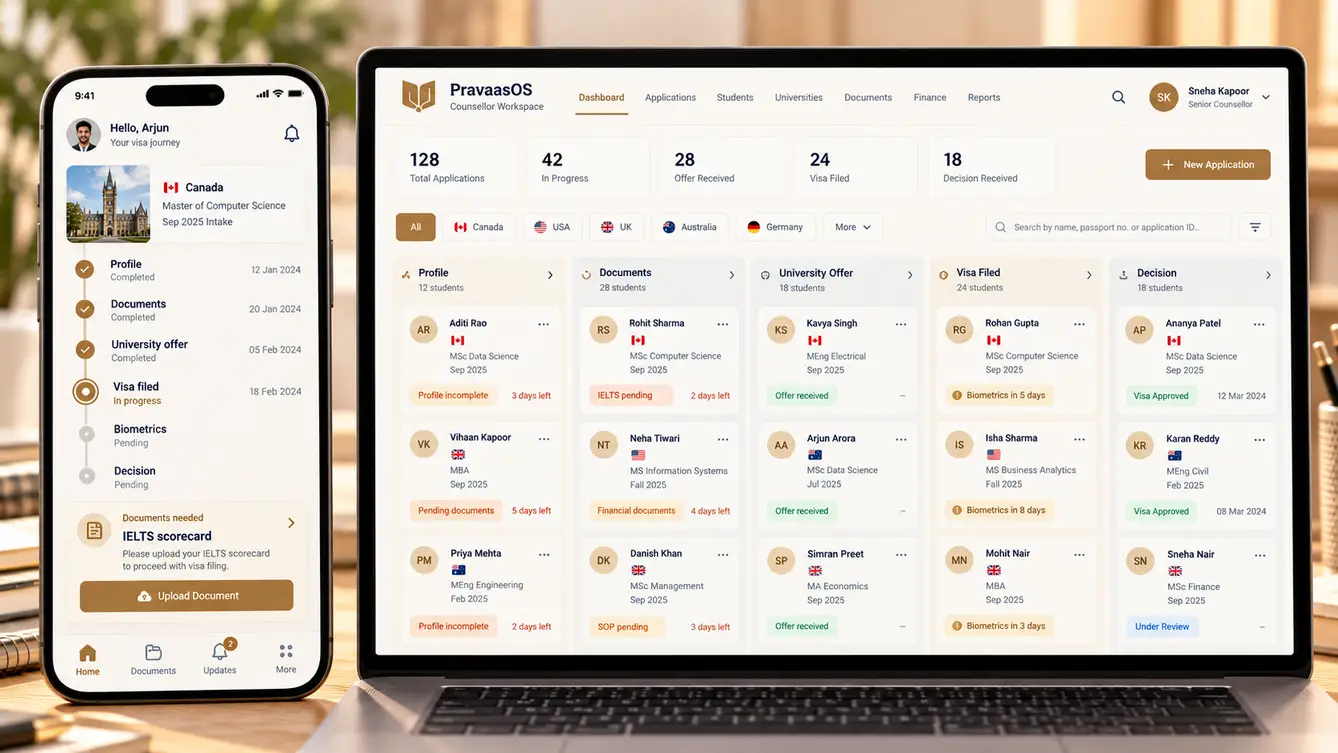
At the centre of PravaasOS is the case: one applicant, one destination, one pathway — study, work or visit — with a checklist of documents and steps specific to that pathway. Counsellors configure the pathway once; the system generates the checklist, deadlines and reminders.
The applicant app shows the same case in plain language: what has been done, what is needed from them and what happens next. It deliberately never promises outcomes or timelines that depend on universities or visa authorities; it shows the consultancy's own steps and the dates it controls.
The team
A focused team with an AI engineer dedicated to document checks, the feature most likely to prevent the costly mistakes the director described.
Branch discovery, pathway configuration and rollout timing.
Case file design and applicant-facing language.
Counsellor workspace, pathways engine and manager console.
Applicant app and document capture.
Document OCR, field extraction and consistency checks.
Pathway scenarios, permissions and data migration checks.
7 people in total, working as one team.
Decisions that mattered
Immigration files contain passports, financial statements and academic records, so data protection shaped several of these decisions.
One generic checklist or pathway-specific ones?
- One checklist for everyone
- Configurable pathways by destination and visa type
Our call: Configurable pathways by destination and visa type. Requirements differ sharply by destination and pathway. Configurable pathways let managers update requirements without developers when rules change.
How much should the applicant app promise?
- Estimated visa decision dates
- Only steps and dates the consultancy controls
Our call: Only steps and dates the consultancy controls. Decision timelines depend on universities and authorities. Showing only what the consultancy controls kept the app honest and avoided false expectations.
AI verification or AI checks?
- AI declares documents valid
- AI flags inconsistencies for staff to resolve
Our call: AI flags inconsistencies for staff to resolve. Staff remain accountable for every file. AI finds mismatches and expiries quickly; documentation executives decide what to do about them.
How to protect sensitive documents?
- Shared drive with folder permissions
- Encrypted storage with branch- and role-based access and full access logs
Our call: Encrypted storage with branch- and role-based access and full access logs. Passports and financial statements demand strict controls. Access is limited to the people working on a case, and every view is logged.
The 25 features
Everything that shipped across the counsellor workspace, applicant app and manager console.
- 01Case pipeline
Every case by stage, counsellor and branch.
- 02Configurable pathways
Checklists and steps by destination and visa type.
- 03Deadline tracking
Intake and filing deadlines with early warnings.
- 04Hand-off workflow
Clear transfer between counselling, documentation and filing.
- 05Case notes and history
Every call, meeting and decision on the timeline.
- 06Document requests
Specific requests sent to applicants with due dates.
- 07OCR field extraction
Names, dates and numbers read from uploaded documents.
- 08Consistency checks
Name and date mismatches across documents flagged.
- 09Expiry alerts
Passports, tests and statements nearing expiry flagged.
- 10Secure document vault
Encrypted storage with per-case access.
- 11Case timeline
What is done, what is needed and what is next.
- 12Document upload
Guided capture with quality checks.
- 13Appointment booking
Book counselling and document sessions.
- 14Fee payments
Consultancy fees paid online with receipts.
- 15WhatsApp updates
Key status changes delivered on WhatsApp.
- 16Enquiry CRM
Leads from walk-ins, website and social media.
- 17Counsellor workload view
Active cases per counsellor for fair allocation.
- 18Branch dashboards
Enquiries, conversions and cases by stage per branch.
- 19Commission and partner tracking
Partner institution commissions tracked per case.
- 20Management reports
Performance across branches and pathways.
- 21Role- and branch-based access
Staff see only the cases they work on.
- 22Access audit log
Every document view and download recorded.
- 23Data retention rules
Documents deleted after the retention period.
- 24Consent records
Applicant consent captured and stored.
- 25Two-factor staff login
Strong authentication for all staff accounts.
Rollout between intakes
Timing mattered: we launched between intake seasons, when counsellors had time to learn. The pilot branch migrated its active cases first, with every document re-uploaded and checked. Branch by branch, the remaining offices followed, each after a hands-on session run by the pilot branch's lead counsellor.
- Weeks 1–2Discovery
A week across two branches; hand-offs and failure points mapped.
- Weeks 3–4Design
Case file, pathways and applicant app prototyped.
- Weeks 5–12Build
Workspace, applicant app, document checks and CRM.
- Weeks 13–15Pilot branch
Active cases migrated and re-checked.
- Weeks 16–18All branches
Branch-by-branch rollout between intake seasons.
What we learned
Catching mistakes early is the whole value. Document checks that flag a name mismatch on day one prevent a rejected application months later.
Honest status beats optimistic status. Applicants trusted the app because it showed only what the consultancy controlled, instead of guessing at outcomes it could not promise.
- Next.js
- React Native
- NestJS
- PostgreSQL
- Document OCR and LLM checks
- WhatsApp Business API
- AWS Mumbai
