
Nivaas: how a residential developer replaced broker WhatsApp groups and paper demand letters with one buyer journey
A mid-sized residential developer sold through dozens of brokers, tracked inventory in spreadsheets and sent payment demands on paper. We built Nivaas: a live inventory and booking system, a broker portal, a buyer app for payments and construction updates, and a CRM for the sales team — 26 features covering the journey from site visit to possession.
The day a flat was sold twice
The project that became Nivaas started with a mistake. On a busy weekend, two brokers each booked the same corner apartment for different buyers. Both had checked the same inventory spreadsheet — on different days. Unwinding it cost the developer a refund, a discount and a very uncomfortable phone call.
The developer's sales head realised the spreadsheet was only one symptom. Brokers shared availability over WhatsApp, site-visit leads were written in a register, payment demand letters were printed and couriered at each construction milestone, and buyers called the sales office every week asking when their tower would be ready.
“We build homes with engineering precision and sell them with a spreadsheet.”
Four groups, one apartment
In discovery we met each group separately: the in-house sales team, three channel brokers, the finance team handling demands and receipts, and a handful of recent buyers. Each described the same apartment differently — a lead, a commission, a receivable, a home — and each needed a different view of it.
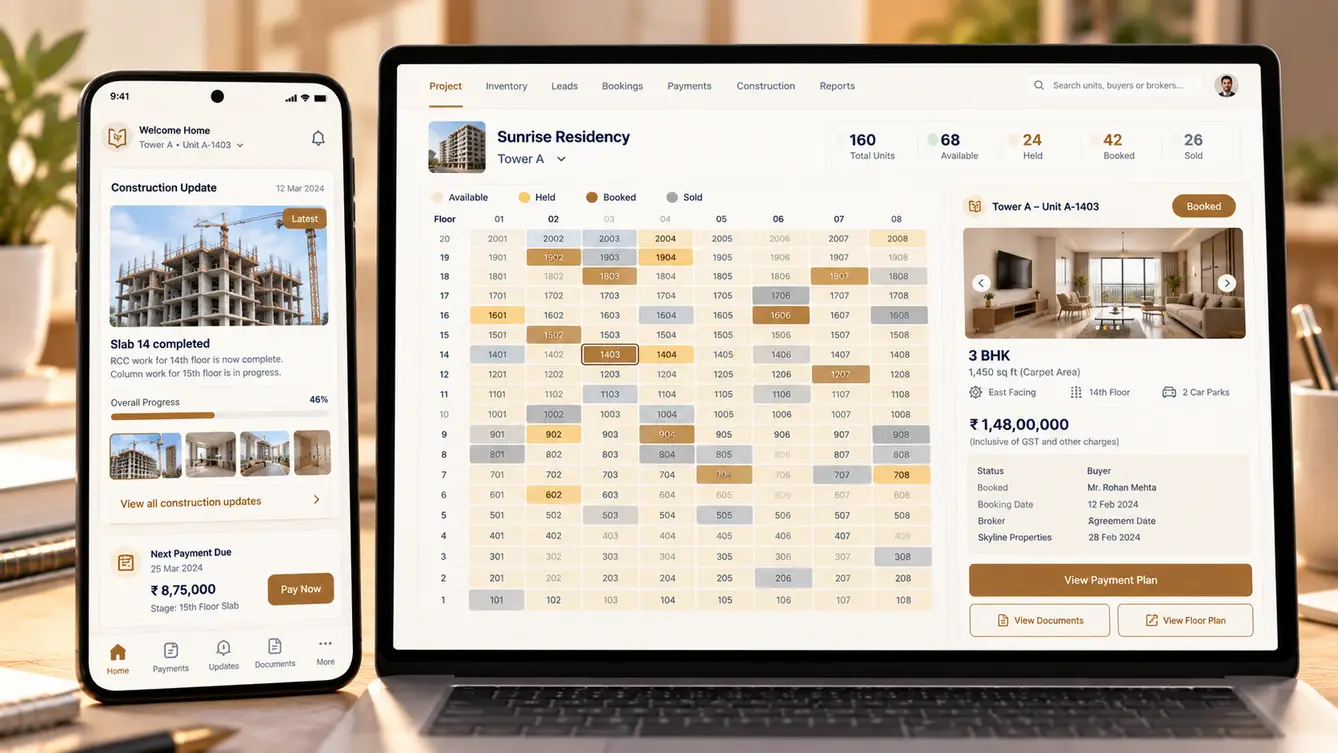
The core design idea was a single live unit record: status, price, holds, the buyer, the broker, the payment plan and the documents, all in one place. Every product in Nivaas would read from and write to that one record, so the kind of double booking that started the project would become impossible.
- Sales: live availability, leads and follow-ups in one place
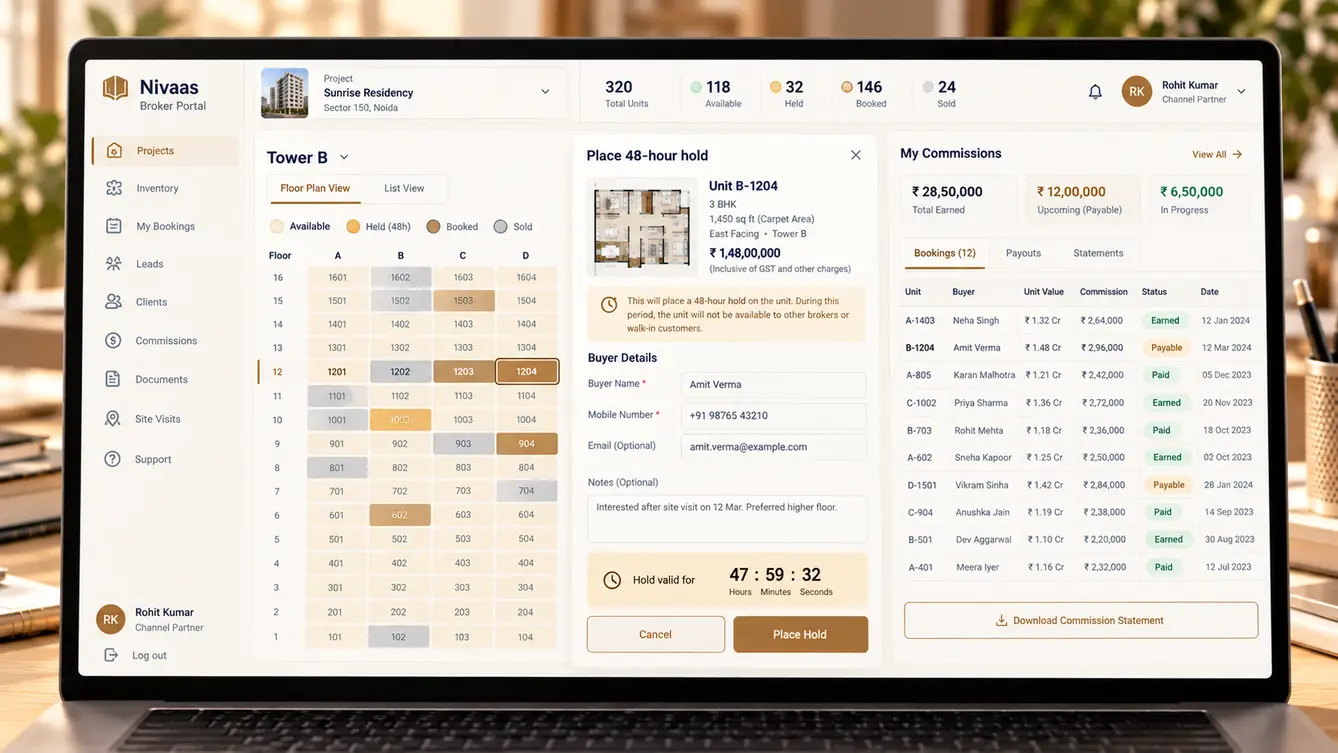
- Brokers: inventory they can trust and commission visibility
- Finance: automatic demands at each milestone and reconciled receipts
- Buyers: payments, documents and honest construction progress

Designing the buyer's journey
Buying a home is one of the biggest financial decisions a family makes, and much of it happens after the booking. We mapped the buyer's journey from site visit to possession — booking amount, agreement, bank loan, construction-linked payments, registration and handover — and designed the buyer app around what a buyer needs to know at each stage.
The feature buyers responded to most in testing was the construction feed: dated, geo-tagged photos from the site team at each milestone, which made the payment demand that followed feel justified rather than arbitrary.
The team
Nivaas spanned four apps and a finance workflow, so we staffed it with separate mobile and web engineers under one engagement lead and one shared backlog.
Stakeholder workshops, migration planning and rollout.
Buyer journey, broker portal and sales CRM.
Buyer app and site-visit tablet app.
Broker portal and sales CRM.
Unit record, booking engine, payment plans and integrations.
Concurrency testing for holds and bookings, payment scenarios.
8 people in total, working as one team.
Decisions we made
These decisions were made with the sales head and finance controller, because each one changed how the business operated.
How to prevent double booking?
- Manual checks by the sales office
- Atomic, time-limited holds on a single live unit record
Our call: Atomic, time-limited holds on a single live unit record. Holds and bookings are enforced at the database level, so two people can never book the same unit, and expired holds release automatically.
Separate systems per project or one platform?
- One deployment per project
- One platform with projects as configuration
Our call: One platform with projects as configuration. Sales and finance needed a view across projects, and new launches should take days to configure, not months to build.
Paper demand letters or digital?
- Keep printing and couriering
- Automatic digital demands at each milestone, with payment links
Our call: Automatic digital demands at each milestone, with payment links. Digital demands linked to verified construction milestones went out on time, came with a payment link and reconciled automatically when paid.
Migrate old projects first or launch new ones first?
- Migrate everything, then launch
- Launch on the newest project, migrate older ones after
Our call: Launch on the newest project, migrate older ones after. A clean new project let the team learn the system without migration risk. Older projects followed once processes were proven.
The 26 features
Everything that shipped in the first release, grouped by the people who use it.
- 01Live inventory chart
Every unit by tower and floor with real-time status.
- 02Time-limited holds
Holds that expire automatically and are visible to everyone.
- 03Online booking
Booking amount paid by UPI or card with instant confirmation.
- 04Dynamic pricing rules
Floor rise, view premiums and offers configured by project.
- 05Cost sheet generator
Accurate cost sheets with charges and taxes.
- 06Lead capture from all channels
Website, portals, brokers and walk-ins in one pipeline.
- 07Site-visit app
Tablet check-in at the site with preferences captured.
- 08Follow-up reminders
Scheduled follow-ups for every open lead.
- 09Sales dashboards
Leads, visits, bookings and conversion by source.
- 10Broker onboarding
Registration with documents and approval.
- 11Availability for brokers
The same live inventory the sales team sees.
- 12Lead registration and protection
Brokers register buyers to protect their commission.
- 13Commission tracking
Earned, payable and paid commissions per booking.
- 14Payment schedule
Every instalment, what it is for and when it is due.
- 15Pay online
UPI and card payments with instant receipts.
- 16Construction feed
Dated, geo-tagged site photos at each milestone.
- 17Document vault
Agreement, receipts, allotment and NOCs in one place.
- 18Loan assistance
Tie-up bank details and document checklists.
- 19Possession checklist
Snag list, registration and handover steps.
- 20Milestone-linked demands
Demands raised automatically when a milestone is verified.
- 21Receipt reconciliation
Payments matched to demands and buyer accounts.
- 22Overdue follow-ups
Reminders and interest calculation for late payments.
- 23Role-based access
Separate rights for sales, brokers, finance and buyers.
- 24Audit trail
Every price change, hold, booking and cancellation recorded.
- 25RERA project updates
Project progress data ready for regulatory disclosures.
- 26Management dashboard
Sales, collections and inventory across all projects.
Rolling out across projects
We launched Nivaas on the developer's newest project first, where inventory was still largely available and there was no history to migrate. Once the sales team and brokers were comfortable, we migrated the older projects, reconciling every existing booking and receipt against the finance team's records before switching them on.
Brokers adopted the portal quickly once holds became automatic and time-limited: a broker could hold a unit for a buyer for 48 hours, and everyone else saw it as held instantly.
- Weeks 1–2Discovery
Sales, broker, finance and buyer interviews.
- Weeks 3–5Design
Unit record model and buyer journey prototyped.
- Weeks 6–14Build
Inventory, booking engine, CRM, broker portal and buyer app.
- Weeks 15–17Launch on new project
Newest project live with sales team and brokers.
- Weeks 18–20Migrate older projects
Existing bookings and receipts reconciled and moved.
What we learned
A single source of truth solves problems nobody listed. Once inventory, bookings and payments shared one record, disputes over commissions and receipts largely disappeared along with the double bookings.
Transparency reduces calls. Buyers who could see construction progress and their payment schedule stopped calling the sales office to ask.
- React Native
- Next.js
- NestJS
- PostgreSQL
- Payment gateway with UPI
- WhatsApp Business API
- AWS Mumbai
