
HangarOne: maintenance tracking for a flying school where every hour of flying is logged, tracked and audited
A flying training organisation kept aircraft maintenance records, component life limits and pilot logbooks in paper books and spreadsheets — and every audit meant days of preparation. We built HangarOne: aircraft and component tracking, maintenance due forecasts, digital work packages, flight scheduling tied to airworthiness and student training records — 24 features for an industry where records are the proof of safety.
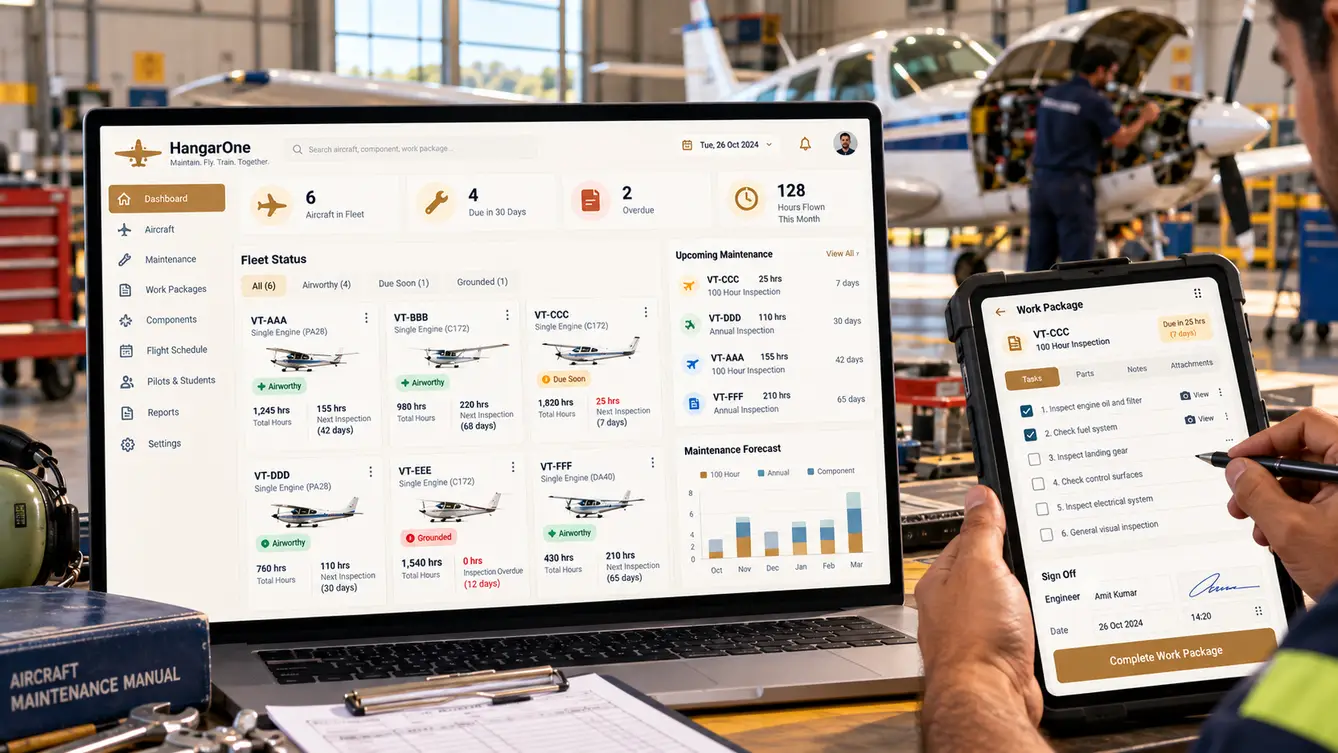
Audit week
HangarOne's chief engineer described the week before every regulatory audit: engineers pulling logbooks, cross-checking component hours against spreadsheets, and making sure every task card had its signatures. The school's safety record was excellent. Proving it took days.
Day to day, the challenge was forecasting. Each aircraft flew several hours a day with students. Inspections came due by hours, by calendar or by cycles, and components had their own life limits. Keeping track meant a spreadsheet only one person fully understood.
“We never fly an aircraft that isn't airworthy. It just takes one engineer and a spreadsheet to be sure.”
In the hangar
We spent time with engineers during inspections and with the flight operations team scheduling students. The two sides were disconnected: operations scheduled flights without seeing that an aircraft would reach its inspection limit mid-week, and maintenance found out when the aircraft arrived with hours already past the limit tolerance.
- One source of truth for aircraft and component hours
- Forecasts of inspections due, visible to flight operations
- Digital task cards with signatures
- Audit-ready records at any moment
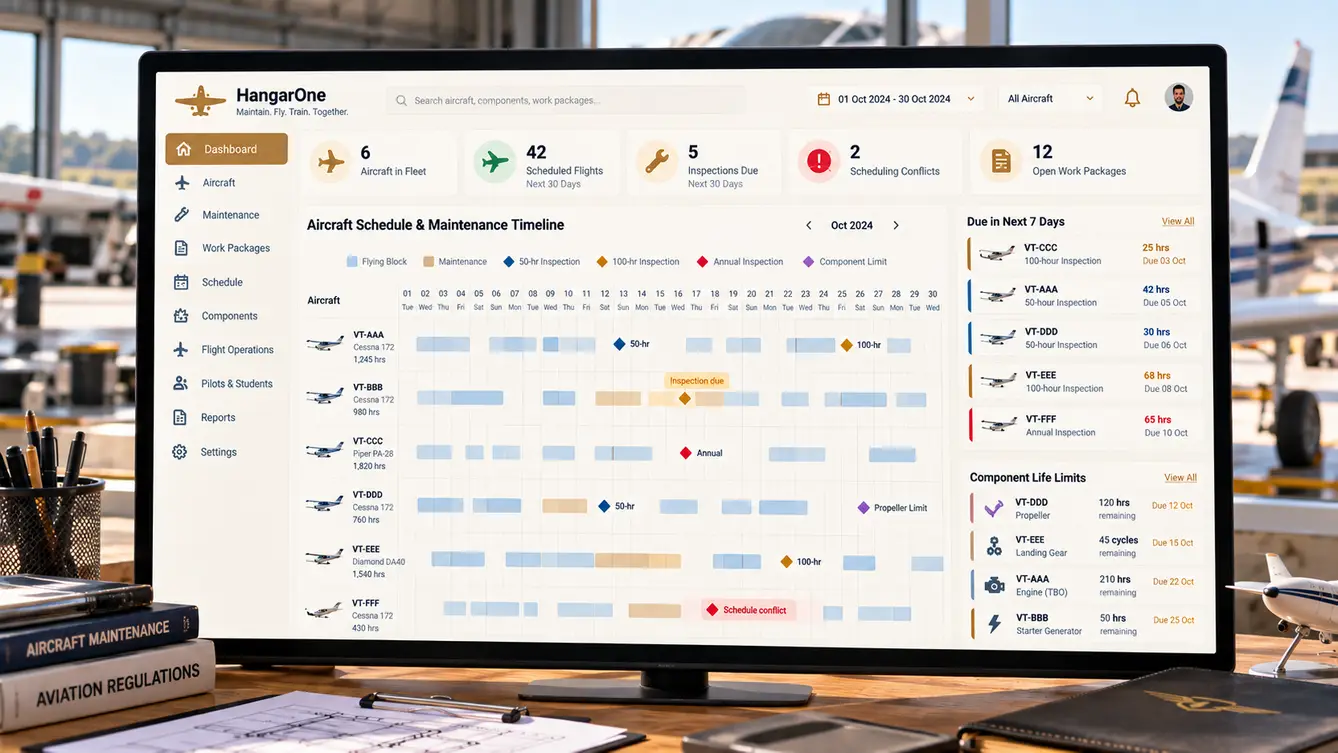
Scheduling that knows about maintenance
The core of HangarOne is a model of every aircraft and its components, each with its limits by hours, calendar and cycles. Flight logs update hours automatically, and the system forecasts when each inspection will fall due based on the flying schedule.
Flight scheduling reads those forecasts. Operations can see that an aircraft will reach its 50-hour inspection on Thursday and plan around it — and the scheduler will not assign an aircraft that is not airworthy.
The team
Aviation records demand accuracy, so QA and a domain reviewer with maintenance experience were involved throughout.
Workshops with engineering, operations and quality.
Aircraft maintenance practices and records review.
Maintenance app, scheduling and student app.
Aircraft model, forecasts, work packages and scheduling.
Engineer tablet app and student app.
Forecast accuracy and parallel-run comparisons.
7 people in total, working as one team.
Decisions we made
Agreed with the chief engineer, head of training and quality manager.
Separate systems for maintenance and scheduling?
- Keep them separate
- One system where scheduling reads maintenance forecasts
Our call: One system where scheduling reads maintenance forecasts. The key failure was scheduling that did not know about maintenance. Connecting them prevented it.
Paper task cards or digital?
- Paper with scanning
- Digital work packages with signatures
Our call: Digital work packages with signatures. Digital task cards made records searchable, complete and audit-ready at any time.
How to switch from paper?
- Immediate cut-over
- Parallel running until records match
Our call: Parallel running until records match. Maintenance records are legal documents. Parallel running proved accuracy before paper was retired.
How to handle corrections?
- Edit records
- Append corrections with reason and signature
Our call: Append corrections with reason and signature. An unaltered history is essential for audits.
The 24 features
Everything that shipped for maintenance, operations, instructors and students.
- 01Fleet register
Aircraft with hours, cycles and status.
- 02Component tracking
Components with life limits and history.
- 03Automatic hour updates
Hours updated from flight logs.
- 04Airworthiness status
Clear airworthy, due soon and grounded states.
- 05Due forecasts
Inspections projected from scheduled flying.
- 06Work packages
Tasks for each inspection type.
- 07Digital sign-offs
Engineer and inspector signatures.
- 08Defect reporting
Defects logged by pilots and engineers.
- 09Parts and inventory
Parts issued against work packages.
- 10Deferred defects
Allowed deferrals tracked to expiry.
- 11Flight scheduling
Aircraft, instructors and students.
- 12Airworthiness checks
Only airworthy aircraft can be scheduled.
- 13Flight logs
Digital flight logs after each sortie.
- 14Weather and cancellations
Cancellations recorded with reasons.
- 15Student training records
Syllabus progress and hours.
- 16Digital logbooks
Student and instructor logbooks.
- 17Instructor currency
Ratings and currency tracking.
- 18Audit pack export
Records assembled for audits.
- 19Immutable audit trail
All changes appended with reason.
- 20Role-based access
Engineers, inspectors, operations, instructors and students.
- 21Airworthiness directive tracking
Applicable directives and compliance status per aircraft.
- 22Tooling calibration
Calibration due dates for workshop tools.
- 23Fleet utilisation reports
Hours flown and availability by aircraft.
- 24Document library
Manuals and procedures with version control.
Running in parallel
Because records are legal documents, HangarOne ran alongside the paper system for two months. Every entry was made in both, and the quality manager compared them weekly. Once they matched consistently and the regulator's requirements for electronic records were met, the paper logs were retired.
- Weeks 1–3Discovery
Hangar and operations observed; records reviewed.
- Weeks 4–6Design
Aircraft model and forecasts designed with engineers.
- Weeks 7–14Build
Maintenance, scheduling and training modules.
- Weeks 15–22Parallel running
Two months alongside paper, compared weekly.
- Week 22Paper retired
Electronic records become primary.
What we learned
Connect planning to constraints. Letting scheduling see maintenance forecasts prevented problems rather than catching them.
In regulated work, run in parallel until the numbers match. Trust in records is earned, not declared.
- Next.js
- React Native
- NestJS
- PostgreSQL
- Digital signatures
- Immutable audit trail
- AWS Mumbai with backups
