
DocketDesk: making sure a litigation firm never misses a hearing again
A litigation practice handled thousands of matters across district courts, high courts and tribunals, tracking hearing dates from daily cause lists by hand. One missed listing could mean an adverse order. We built DocketDesk: automated cause-list tracking, a matter calendar, AI summaries of orders, a client update portal and court-wise work allocation — so every advocate knows where they need to be, every morning.
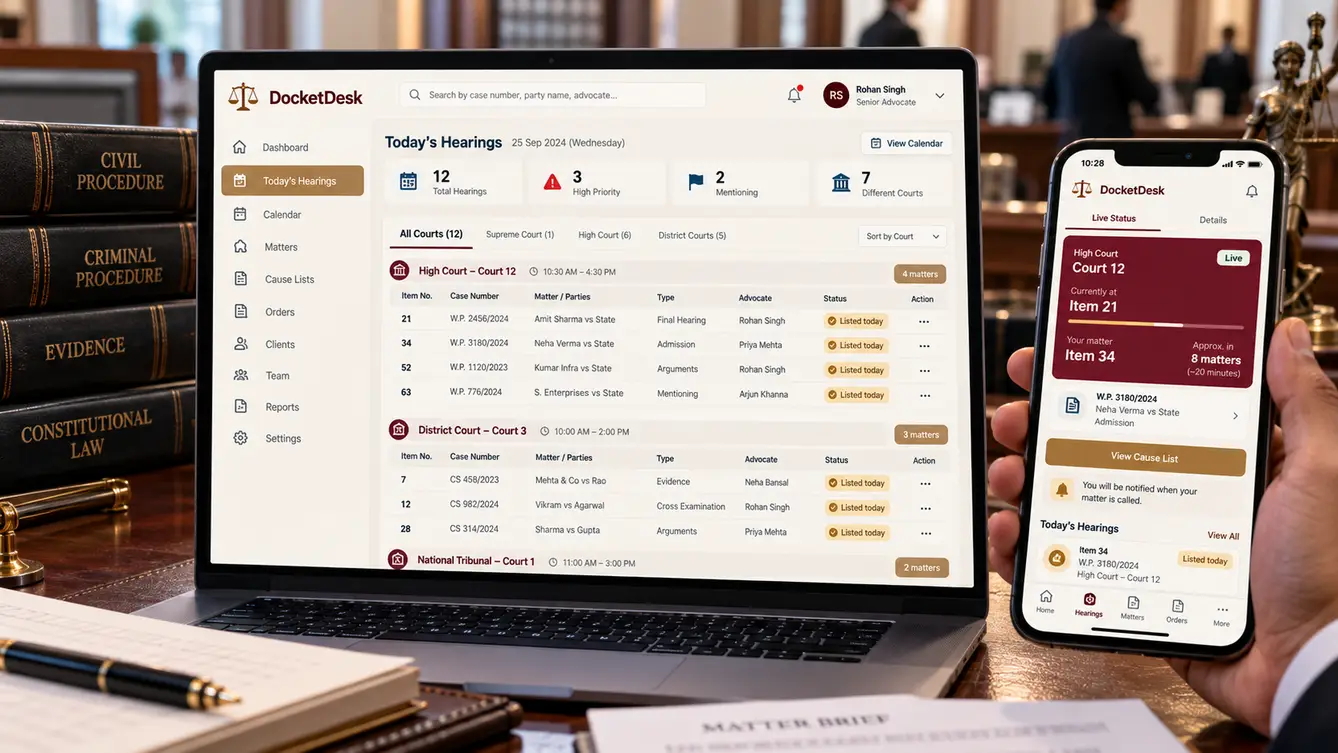
The matter that was listed and missed
DocketDesk's senior partner described the night he learned a matter had been listed that morning in a court the firm did not check that day. Nobody appeared, and the court passed an adverse order that took weeks to set aside. The firm checked cause lists every evening by hand — dozens of courts, thousands of matters, a team of clerks with printouts and highlighters.
“In litigation, a missed date isn't an inconvenience. It's a lost case.”
An evening with the clerks
We sat with the clerks while they checked the next day's cause lists. Each court published its list differently; case numbers were formatted inconsistently; some lists were revised late at night. Matching thousands of firm matters against them by eye was slow and error-prone, and the result lived in a spreadsheet emailed to advocates.
- Every court publishes lists in its own format
- Case numbers written inconsistently
- Late revisions to next-day lists
- Orders downloaded and read manually

Matching lists to matters, automatically
DocketDesk ingests cause lists from every court the firm appears in, normalises case numbers and matches them to the firm's matters. Every listing appears on the firm calendar, assigned to the advocate on the matter, with a morning summary on their phone. Late revisions trigger alerts.
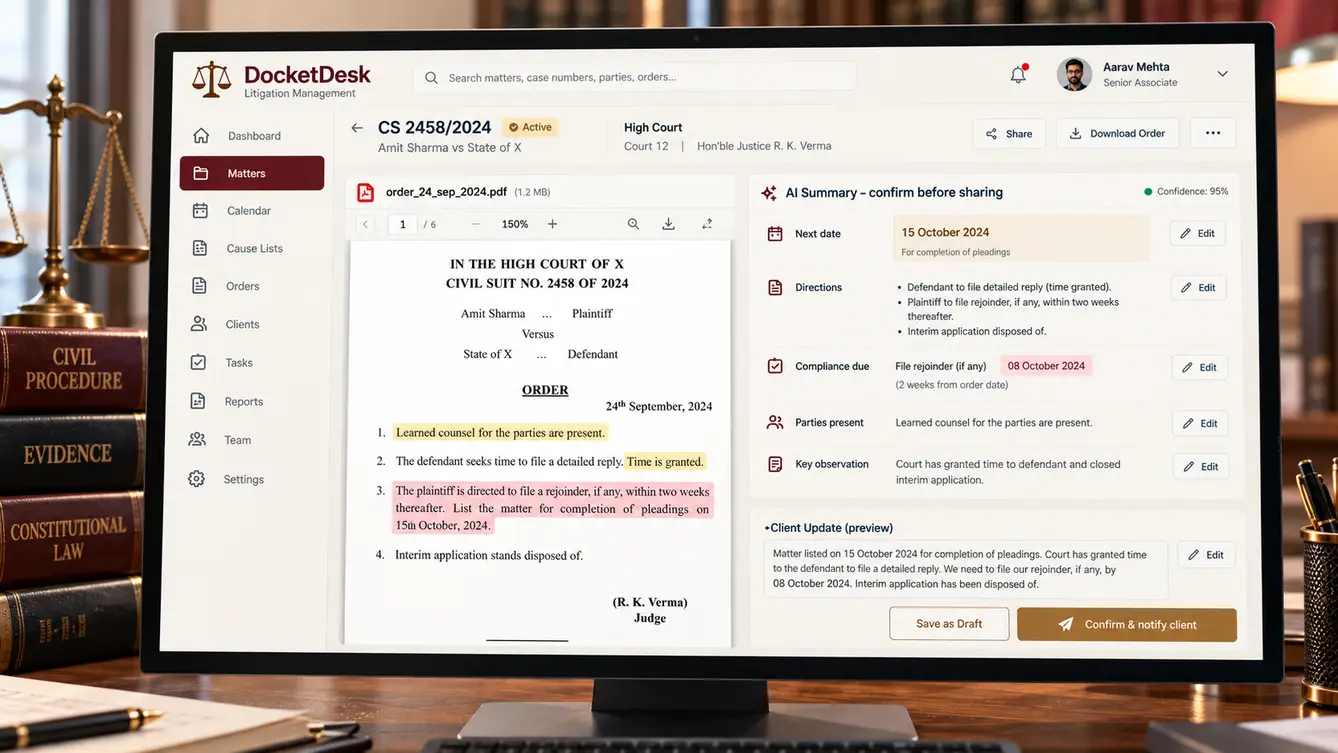
When orders are uploaded by courts, DocketDesk fetches them and produces a short AI summary — next date, directions, compliance required — for the advocate to confirm. Clients see updates in their portal once confirmed.
The team
Court data ingestion was the core risk, so a data engineer focused on it from day one.
Partner workshops and parallel-run oversight.
Calendar, advocate app and client portal.
Cause-list ingestion and case-number matching.
Matters, calendar, allocation and portal.
Order summarisation and evaluation.
6 people in total, working as one team.
Decisions we made
Agreed with the senior partners and office manager.
Manual checks or automated matching?
- Better spreadsheets for clerks
- Automated ingestion and matching
Our call: Automated ingestion and matching. Thousands of matters against dozens of lists daily is exactly where humans miss things.
How to switch over?
- Immediate switch
- A month in parallel with clerks
Our call: A month in parallel with clerks. A missed listing is costly. Parallel running proved reliability first.
Should clients see AI summaries directly?
- Automatic client updates
- Advocate confirms before sharing
Our call: Advocate confirms before sharing. Legal information sent to clients must be accurate and considered.
Every feature, module by module
Everything that shipped for advocates, clerks, partners and clients.
- 01Cause-list ingestion
Lists from every court the firm appears in.
- 02Case-number normalisation
Matches however numbers are formatted.
- 03Automatic listing matches
Listings linked to firm matters.
- 04Late revision alerts
Alerts when lists change overnight.
- 05Live board status
Current item in court where available.
- 06Firm calendar
Hearings by court, date and advocate.
- 07Morning briefings
Today's matters on the advocate's phone.
- 08Court-wise allocation
Assign appearances efficiently.
- 09Matter notes
Notes and documents per matter.
- 10Order fetching
Orders downloaded when published.
- 11AI order summaries
Next date, directions and compliance.
- 12Compliance tasks
Deadlines from orders tracked.
- 13Advocate confirmation
Summaries confirmed before sharing.
- 14Client portal
Matter status and confirmed updates.
- 15WhatsApp updates
Hearing outcomes to clients.
- 16Matter intake
New matters with parties and courts.
- 17Billing by appearance
Fees recorded per hearing.
- 18Partner dashboard
Workload and upcoming critical dates.
- 19Role-based access
Partners, advocates, clerks and clients.
- 20Audit trail
Every change recorded.
Launch
DocketDesk ran alongside the clerks' manual checks for a month, and every discrepancy was investigated. Once the automated matching consistently caught everything the clerks did — and some they did not — the manual process was retired and clerks moved to preparing briefs.
- Weeks 1–2Discovery
Evenings with clerks; courts catalogued.
- Weeks 3–4Design
Calendar and advocate app prototyped.
- Weeks 5–13Build
Ingestion, matching, orders and portal.
- Weeks 14–17Parallel run
A month alongside manual checks.
- Week 18Launch
Manual process retired.
What we learned
Automate the high-stakes, repetitive work first. Cause-list matching was tedious and critical — perfect for software.
Keep lawyers in the loop on anything clients see. Confirmed summaries built trust with both advocates and clients.
- Next.js
- React Native
- Python / FastAPI
- PostgreSQL
- Court data ingestion pipelines
- LLM order summarisation
- WhatsApp Business API
- Private cloud
