
Dastavez AI: building a contract review assistant that lawyers were willing to trust
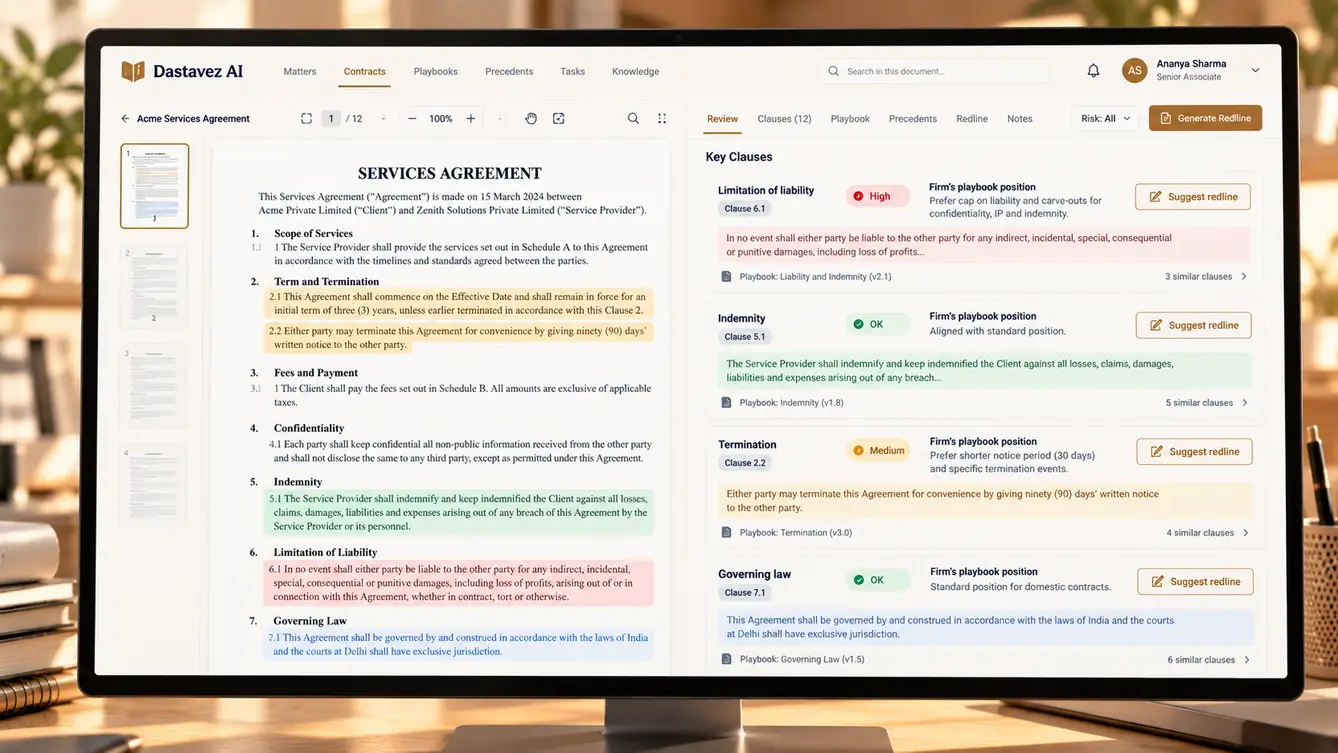
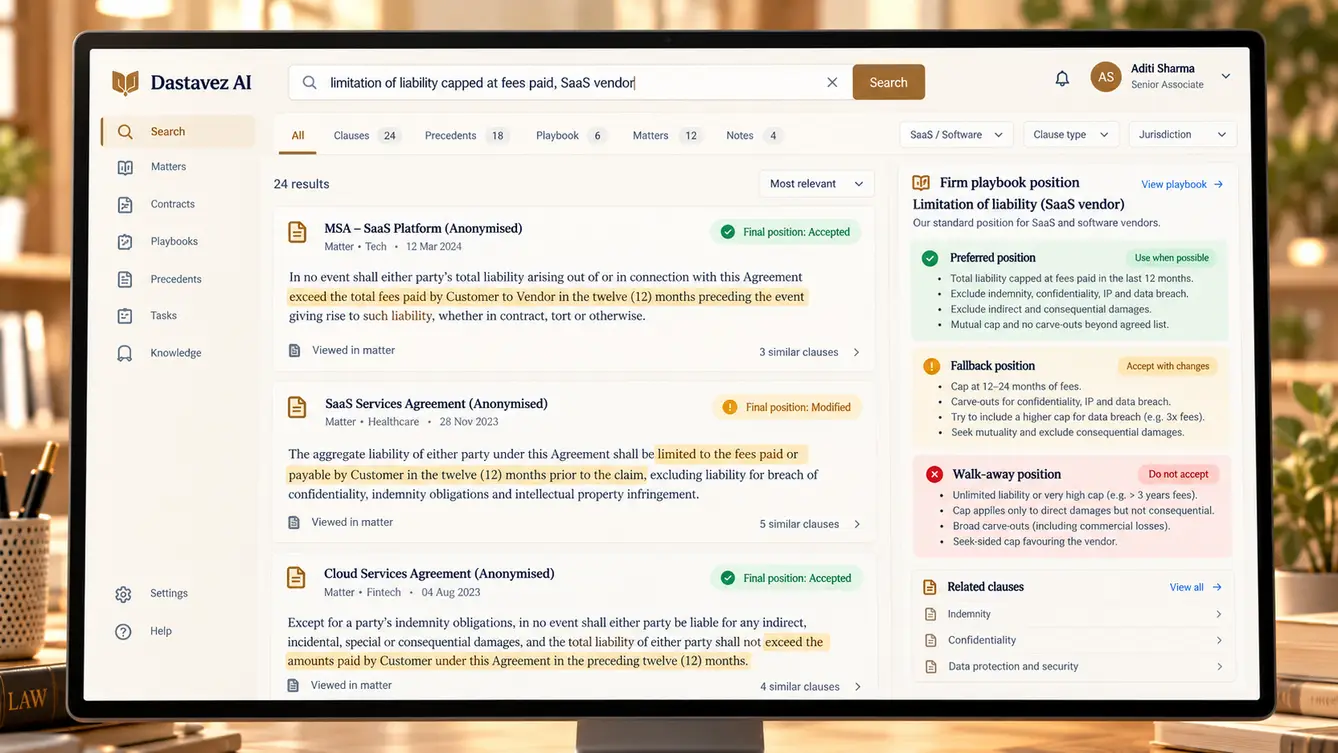
A corporate law firm's associates spent their nights comparing contracts against the firm's own playbooks. We built Dastavez AI: a matter workspace with clause extraction, playbook-based risk review, precedent search over the firm's own documents and redline drafting — 24 features, every one of them showing its sources.
The associate's late nights
Dastavez AI's managing partner told us about a first-year associate who had reviewed the same vendor agreement template forty times in a month — each time checking the same fifteen clauses against the firm's playbook, each time late at night because the client wanted comments by morning.
The firm had tried two generic AI tools. Associates stopped using them within a week. The tools summarised contracts fluently, but they did not know the firm's positions, could not say where their answers came from, and occasionally invented clauses that did not exist. For a law firm, that last point ended the conversation.
“I don't need a tool that sounds clever. I need one that shows me the clause.”
Designing for trust before capability
Our first workshop was with three partners and two associates. We asked them to describe what would make them trust an AI review. The answers shaped every screen: show the exact clause text, show which playbook rule applies, show similar clauses the firm has negotiated before, and never state anything the document does not support.
That became our non-negotiable rule. Every statement Dastavez AI makes links to a location in the contract or in the firm's own documents. If it cannot cite a source, it says so.
- Every finding linked to the exact clause text
- Positions taken from the firm's playbook, not generic advice
- Precedents from the firm's own past matters
- Client documents never used to train external models

Turning playbooks into something a machine can use
The firm's playbooks lived in Word documents: preferred positions, acceptable fallbacks and walk-away points for each clause type, written for humans. We worked with a senior associate to restructure them into clause-by-clause rules with examples, which the review engine could apply and cite.
This work had a side effect the partners valued: for the first time, the playbooks were consistent across practice groups, and gaps — clause types with no agreed position — became visible.
The team
Legal AI is as much about evaluation as about generation, so we staffed a dedicated evaluation role alongside the AI engineers.
Partner workshops, confidentiality requirements and rollout.
Review workspace, citation patterns and the Word add-in.
Clause extraction, playbook review and redline drafting.
Answer-key dataset from past reviews and regression scoring.
Matter workspace, search, permissions and integrations.
Private cloud deployment, encryption and access controls.
8 people in total, working as one team.
The decisions that earned the firm's trust
Confidentiality and accuracy drove every architectural decision. Each was reviewed with the firm's partners and IT lead.
Where should client documents live?
- Third-party SaaS AI tool
- Firm's own private cloud with no-training model agreements
Our call: Firm's own private cloud with no-training model agreements. Client confidentiality is non-negotiable. Documents stay in the firm's environment, and models are accessed under agreements that exclude training on firm data.
Generic legal knowledge or the firm's playbooks?
- General legal best practice
- The firm's own structured playbooks and precedents
Our call: The firm's own structured playbooks and precedents. Associates must advise according to the firm's positions. Grounding reviews in the firm's playbooks made findings actionable and consistent.
How strict should citations be?
- Citations where available
- No statement without a citation; say 'not found' otherwise
Our call: No statement without a citation; say 'not found' otherwise. One fabricated clause would have ended adoption. Refusing to answer without a source was the rule that made the tool trustworthy.
Web app only, or inside Word too?
- Web workspace only
- Web workspace plus a Word add-in
Our call: Web workspace plus a Word add-in. Lawyers draft in Word. A lightweight add-in brought findings and redlines to where the work actually happens.
How to measure quality?
- Lawyer feedback after launch
- Evaluation set from past reviews before any live use
Our call: Evaluation set from past reviews before any live use. Past reviews gave a real answer key. Scoring against it before launch meant the firm could see evidence rather than take our word for it.
The 24 features
Everything that shipped in the first firm-wide release.
- 01Clause extraction
Identify and label clauses in any uploaded contract.
- 02Playbook review
Compare each clause with the firm's preferred and fallback positions.
- 03Risk flags with sources
Every finding linked to the exact clause and playbook rule.
- 04Missing clause detection
Flags clauses the playbook expects but the contract lacks.
- 05Suggested redlines
Draft amendments in the firm's preferred language.
- 06Version comparison
What changed between the counterparty's drafts.
- 07Precedent search
Find how the firm has negotiated similar clauses before.
- 08Structured playbooks
Positions, fallbacks and walk-away points per clause type.
- 09Clause library
Approved standard clauses ready to insert.
- 10Q&A over a matter
Ask questions about a contract set with cited answers.
- 11Matter folders
Contracts, versions and notes organised by client matter.
- 12Review assignments
Assign documents to associates with due dates.
- 13Partner review view
See AI findings and associate comments side by side.
- 14Issue list export
Export findings as a client-ready issues list.
- 15Word add-in
Findings and redlines inside the document being drafted.
- 16Private cloud deployment
All documents and indexes in the firm's environment.
- 17Matter-level access control
Ethical walls enforced per matter.
- 18Encryption at rest and in transit
Documents encrypted everywhere they are stored or sent.
- 19Usage audit log
Every document opened and every AI query recorded.
- 20Evaluation dashboard
Quality scores for every model or prompt change.
- 21SSO login
Sign-in through the firm's identity provider.
- 22Retention controls
Documents deleted per the firm's retention policy.
- 23Admin console
Manage users, practice groups and playbooks.
- 24Model configuration
Choose and switch models without changing workflows.
Proving it on the firm's own contracts
Before any associate used Dastavez AI on live work, we built an evaluation set from contracts the firm had already reviewed, with the associates' actual comments as the answer key. Every change to prompts, models or retrieval was scored against it: did the review find the issues the associate found, did it flag anything the associate had not, and did it ever cite something that was not there.
Only when the tool reliably found what associates found — and never fabricated a citation on the evaluation set — did we open it to one practice group, then the whole firm.
- Weeks 1–3Discovery
Partner and associate workshops; confidentiality and trust requirements.
- Weeks 4–7Playbooks and evaluation set
Playbooks restructured; past reviews turned into an answer key.
- Weeks 8–15Build
Extraction, review, precedent search, workspace and Word add-in.
- Weeks 16–18Practice-group pilot
One practice group on live matters with partner oversight.
- Weeks 19–20Firm-wide rollout
All practice groups, with training for associates.
How associates actually use it
Associates use Dastavez AI as a first pass, not a final answer. They open a contract, run the playbook review, read the findings with their sources, and then write their own comments — often starting from the suggested redline. Partners reviewing the work can see which issues the tool found and which the associate added.
The most-used feature was one we almost left out: precedent search, which lets a lawyer ask how the firm has negotiated a particular clause for similar clients before.
What we learned
In professional services, citations are the product. The firm adopted Dastavez AI because it could show its work, not because of the model behind it.
The most valuable data was already inside the firm. Its playbooks and past matters made the tool specific, and no generic model could have supplied that.
- Next.js
- Python / FastAPI
- PostgreSQL with pgvector
- LLM orchestration with evaluation harness
- Document parsing
- Private cloud deployment
