
ChikitsaOne: fixing a multi-specialty hospital's OPD, one queue at a time
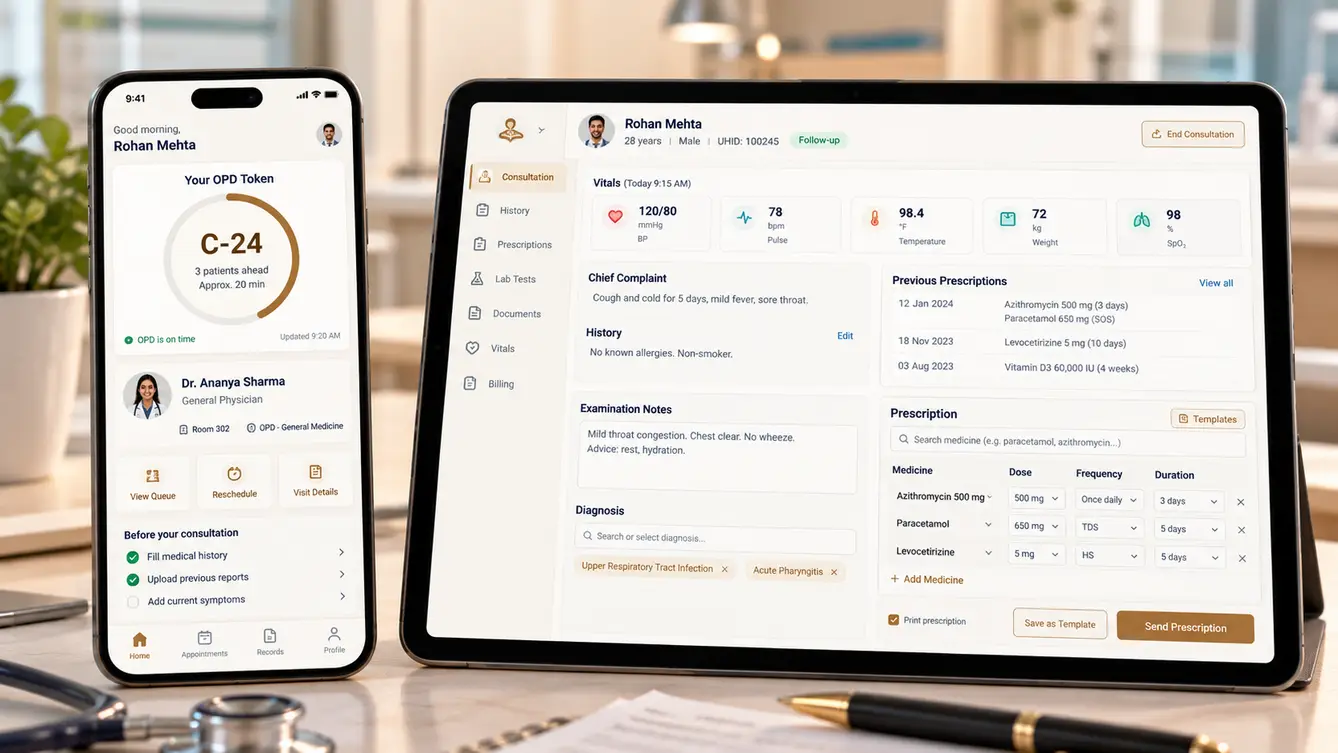
A multi-specialty hospital's outpatient department had patients waiting hours with no idea when they would be seen, and doctors writing on paper that nobody could read later. We built ChikitsaOne: online appointments, a live token and queue system, a fast doctor's console with structured prescriptions, and lab and pharmacy integration — 27 features built around fifteen-minute consultations.
Three hours in the waiting room
Our first meeting with ChikitsaOne's medical director was not in a boardroom. She asked us to sit in the orthopaedic OPD waiting area for a morning. Patients arrived at nine for appointments that did not happen until noon. Nobody knew their position in the queue; relatives hovered at the doctor's door asking "how many more?"; staff answered the same question hundreds of times.
Inside the consultation rooms, doctors were writing prescriptions by hand, reading old paper files that patients had to carry, and ordering tests on slips that the lab sometimes could not decipher. The hospital's clinical quality was excellent. Its outpatient experience did not reflect it.
“Our doctors give a patient fifteen good minutes. Then we make them wait three hours for it.”
Mapping the OPD flow
We mapped the patient's path through the OPD: registration, billing, vitals, waiting, consultation, tests, pharmacy and follow-up booking. The biggest discovery was that queues were not really about doctor speed. They were about unpredictable arrivals, walk-ins mixed with appointments with no rules, and patients returning with test reports and joining the back of the line.
We also timed consultations. Doctors spent a surprising share of each consultation searching for previous information — earlier prescriptions, test values, allergies — that was either on paper or in a system that took too many clicks to reach.
- All appointment patients told to arrive at the start of the session
- Walk-ins and appointments mixed without rules
- Patients returning with reports rejoining the full queue
- Doctors searching for past records during consultations
Designing the doctor's fifteen minutes
We designed the doctor console with one metric in mind: seconds of doctor attention spent on software. The patient summary loads before the patient walks in — allergies, chronic conditions, last prescription, recent results. Prescriptions are built from favourites and recent medicines with dose defaults; a common prescription takes a few taps. Doctors who prefer speaking can dictate notes, which are transcribed into the record for them to review.
We tested the console with doctors from four departments using real (anonymised) cases and a stopwatch. If a change added time, it did not ship.
The team
We included a clinical informatics consultant — a doctor with software experience — to review every clinical workflow alongside the hospital's own department heads.
Department rollout planning and on-floor support.
Clinical workflow review and safety checks.
Doctor console, queue experience and patient app.
Patient app for appointments, tokens and records.
Doctor console, reception and queue displays.
Scheduling, clinical records, lab and pharmacy integration.
Clinical scenarios, load testing for peak OPD hours.
9 people in total, working as one team.
Decisions we made with the clinicians
In healthcare, every design decision is also a safety decision. Each of these was reviewed with the medical director and department heads.
One arrival time or time slots?
- All patients arrive at session start
- Time-slotted appointments with walk-in rules
Our call: Time-slotted appointments with walk-in rules. Waiting was driven by everyone arriving at once. Slots spread arrivals, and clear walk-in rules kept emergencies and walk-ins fair.
Free-text or structured prescriptions?
- Free-text typing
- Structured prescriptions with favourites and safety checks
Our call: Structured prescriptions with favourites and safety checks. Structured prescriptions enable allergy and interaction checks, legible printouts and pharmacy integration, while favourites keep them fast.
Should AI suggest diagnoses?
- AI diagnosis suggestions
- AI only for dictation and summarising history
Our call: AI only for dictation and summarising history. Clinical decisions belong to doctors. AI saves time by transcribing notes and summarising records, never by suggesting diagnoses.
Cloud or hospital-hosted?
- Public SaaS
- Private cloud controlled by the hospital
Our call: Private cloud controlled by the hospital. Patient records are highly sensitive. A private deployment under the hospital's control met its data-protection policy and gave predictable performance.
Returning patients with reports: rejoin the queue?
- Back of the queue
- Priority review slot with the same doctor
Our call: Priority review slot with the same doctor. Patients returning only to show a report needed a minute, not a full consultation. Priority review slots removed a major source of repeated waiting.
The 27 features
Everything that shipped across patients, reception, doctors and the wider hospital.
- 01Online appointment booking
Doctor and slot selection with confirmation.
- 02Live token tracking
Queue position and estimated time on the phone.
- 03Digital prescriptions
Prescriptions and advice available in the app.
- 04Test reports
Lab results delivered to the app when ready.
- 05Follow-up reminders
Reminders for follow-ups and medicine refills.
- 06Health ID linking
Link records with the national digital health ID.
- 07Fast registration
New patients registered in under a minute.
- 08Token generation
Tokens for appointments and walk-ins with priority rules.
- 09Waiting-area displays
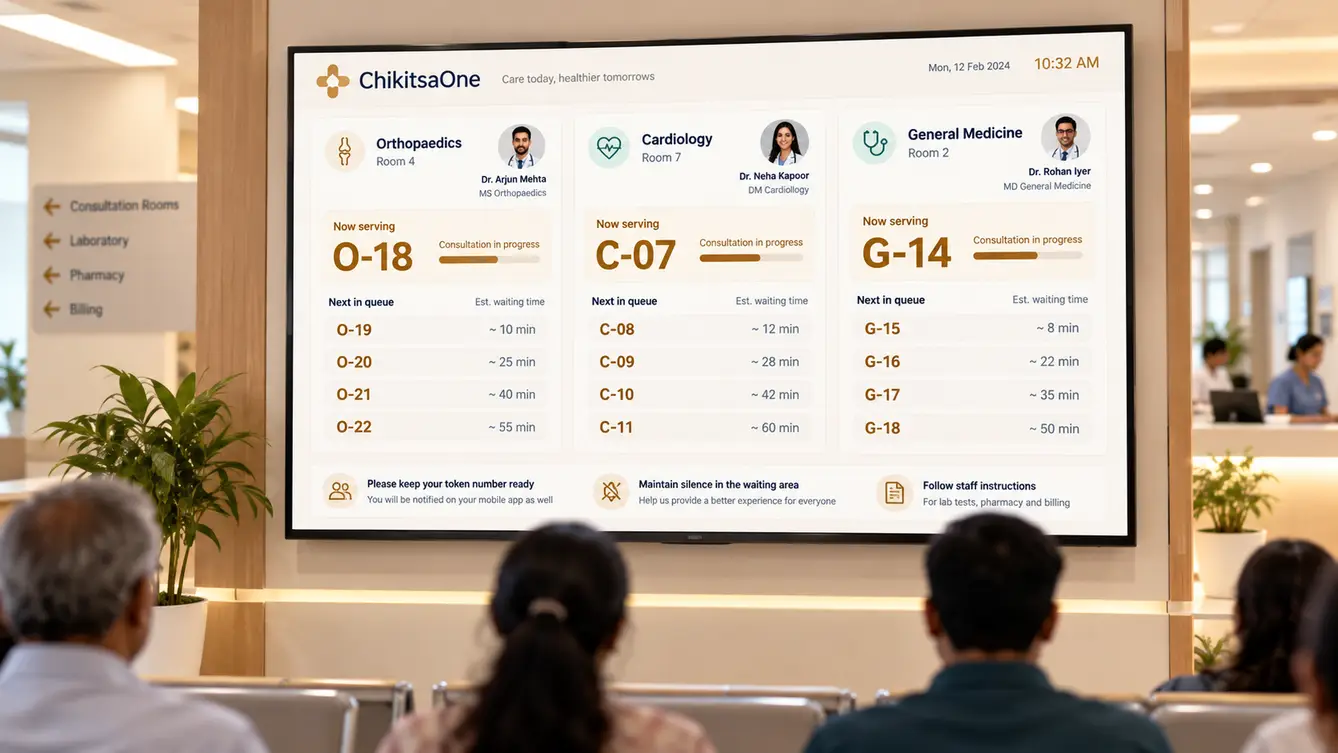
Live queues per doctor on screens.
- 10Vitals capture
Nurses record vitals before the consultation.
- 11OPD billing
Consultation and procedure billing with receipts.
- 12Pre-loaded patient summary
Allergies, conditions, last prescription and recent results.
- 13Structured prescriptions
Favourites, dose defaults and one-tap repeats.
- 14Allergy and interaction alerts
Warnings before a prescription is saved.
- 15Voice notes
Dictated notes transcribed for review.
- 16Test ordering
Orders sent directly to lab and radiology.
- 17Department templates
Specialty-specific templates chosen by department heads.
- 18Lab integration
Orders in, results back into the record automatically.
- 19Pharmacy integration
Prescriptions sent to the in-house pharmacy.
- 20Department scheduling
Doctor rosters and session capacities.
- 21OPD analytics
Waiting times, consultations and no-shows by department.
- 22Role-based access
Separate rights for reception, nurses, doctors and admin.
- 23Access audit log
Every record view and edit recorded.
- 24Consent management
Patient consent captured for record sharing.
- 25Downtime mode
Printable token and prescription fallback if systems are down.
- 26Data backup and recovery
Tested backups with recovery procedures.
- 27Privacy controls
Sensitive notes restricted to treating clinicians.
Rolling out one department at a time
We launched in orthopaedics, the busiest OPD and the one where we had started, with our team on the floor for the first two weeks. Reception staff kept a paper fallback for the first days. Time-slotted appointments changed arrivals immediately: patients with a slot came near their slot instead of at nine.
Other departments followed in waves. Each department head chose their own prescription favourites and templates before going live, which did more for doctor adoption than any training session.
- Weeks 1–3Discovery
Waiting-area observation, OPD flow mapping, consultation timing.
- Weeks 4–6Design
Doctor console tested with a stopwatch; queue rules agreed.
- Weeks 7–15Build
Patient app, reception, console, displays and integrations.
- Weeks 16–18Orthopaedics pilot
Busiest OPD live with on-floor support.
- Weeks 19–22All departments
Department-by-department rollout with custom templates.
What we learned
Queues are a scheduling problem before they are a software problem. Time-slotted arrivals and clear walk-in rules did more than any display screen.
Measure the doctor's time, not the software's features. Every second saved in the console was a second returned to the patient.
- React Native
- Next.js
- NestJS
- PostgreSQL
- FHIR-style clinical records
- Speech-to-text for notes
- ABDM integration
- Private cloud
