
NiveshDesk: giving a wealth advisory firm one view of every client, and giving clients a reason to open the app
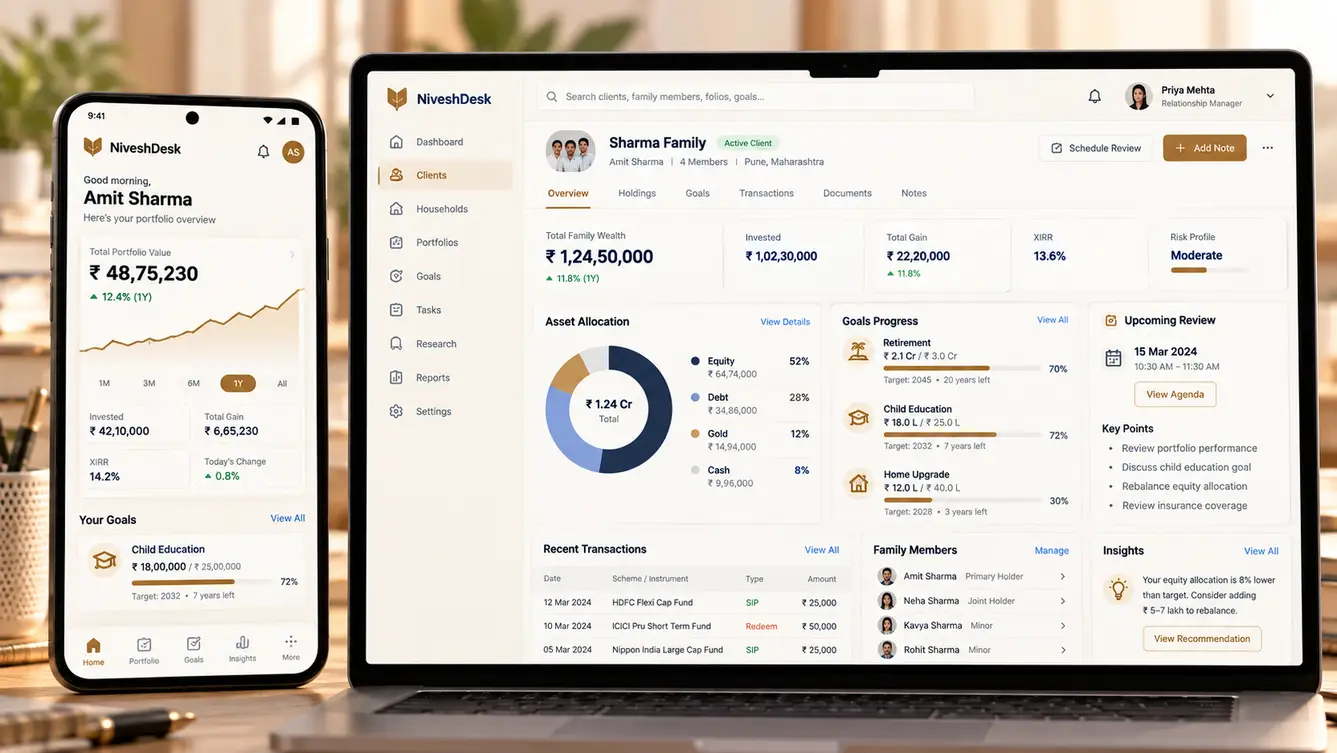
A growing wealth advisory firm had advisors switching between five tools and clients receiving PDF reports once a quarter. We built NiveshDesk: an advisor workbench that consolidates holdings across platforms, a client app with live portfolios and goals, and AI-drafted review notes — 25 features built around the advisor's weekly rhythm.
Five browser tabs and a quarterly PDF
When we first watched a NiveshDesk advisor prepare for a client review, she had five browser tabs open: a mutual fund platform, a broking back office, an insurance tracker, a spreadsheet of goals and the firm's CRM. Preparing one review took nearly two hours, most of it copying numbers into a presentation.
Clients, meanwhile, heard from the firm through a quarterly PDF. Many never opened it. The founder's worry was not that clients were unhappy — it was that they did not see the value of advice between reviews, and some had started drifting toward do-it-yourself investing apps.
“Our advice is good. Our clients just don't see it happening.”
Thinking in households, not accounts
In the first workshop the advisors kept using one word: family. A client was never one account; it was a husband's equity portfolio, a wife's mutual funds, a parent's fixed deposits, a child's education goal and an insurance policy that belonged to all of them. The existing tools thought in accounts, so advisors rebuilt the family picture by hand every time.
That became the core of NiveshDesk's data model: households made of members, members holding accounts across platforms, and goals that draw on assets from anywhere in the household.

The hard part: getting holdings in
Holdings lived in several places, each with its own export format and update cycle: mutual fund registrars, a broking back office, insurance records and manually entered fixed deposits and property. We built ingestion pipelines for each source, a mapping layer that identified the same security across sources, and a daily consolidation job so the advisor's view was always current as of the previous day.
Data quality checks ran on every import. If a holding changed by an implausible amount or a folio appeared under the wrong member, it was flagged for the operations team rather than silently shown to a client.
- The same fund appearing under different names across sources
- Joint holdings shared between household members
- Manual assets like property and fixed deposits
- Corporate actions such as splits, bonuses and mergers
A workbench for the advisor's week
Advisors do not work client by client at random; they work in a weekly rhythm of reviews, rebalancing, follow-ups and new-client onboarding. The workbench opens on "This week": upcoming reviews, portfolios that have drifted from their target allocation, pending tasks and clients who have not been contacted in a while.
The client app went the other way — calm and simple. A single number for household wealth, progress toward each goal, and a short note from the advisor after every review. We deliberately left out real-time price tickers; the firm's philosophy was long-term, and the app should not encourage daily anxiety.
The team
Because data consolidation was the foundation, a data engineer joined in the first week and stayed through launch.
Advisor workshops, compliance sign-off and launch sequencing.
Advisor weekly workflow and the calm client app.
Next.js advisor workbench and operations console.
React Native client app.
Household model, APIs, tasks and permissions.
Holdings ingestion, security mapping and quality checks.
Review note drafting and research summaries.
8 people in total, working as one team.
Decisions we made with the advisors
Wealth software carries regulatory and trust obligations, so each of these was agreed with the founder and the firm's compliance officer.
Accounts or households as the core model?
- Account-centric like existing tools
- Household-centric with members, accounts and goals
Our call: Household-centric with members, accounts and goals. Advisors plan for families. A household model made goals, joint holdings and family reviews natural instead of reconstructed by hand.
Real-time prices in the client app?
- Live prices and daily movements
- Previous-day valuations and goal progress
Our call: Previous-day valuations and goal progress. The firm's advice is long-term. Daily valuations are accurate enough and avoid encouraging clients to react to short-term movements.
How should AI be used?
- AI recommendations to clients
- AI drafts for advisors to edit and approve
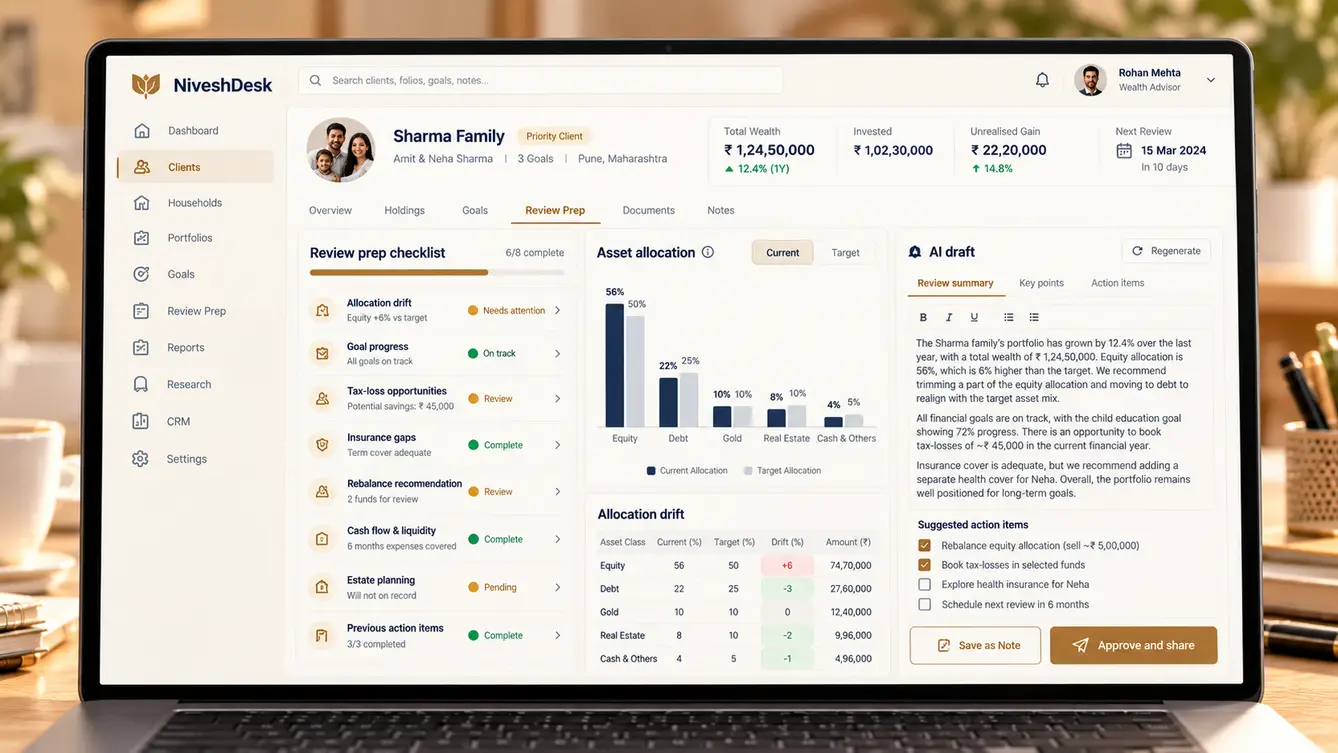
Our call: AI drafts for advisors to edit and approve. Personalised investment recommendations must come from a registered advisor. AI saves advisors time by drafting summaries grounded in approved content, and nothing reaches a client without approval.
Show data immediately or after review?
- Show clients all imported data instantly
- Quality checks and advisor review before first client access
Our call: Quality checks and advisor review before first client access. One wrong number on a client's first login destroys trust. Flagged imports and an advisor-first launch meant clients only saw clean data.
The 25 features
Everything that shipped in the first release, grouped by who uses it.
- 01"This week" home
Reviews due, drifted portfolios, tasks and quiet clients.
- 02Household view
Every member, account and goal in one place.
- 03Allocation drift alerts
Portfolios outside their target allocation band.
- 04Review preparation
Numbers assembled automatically for each review.
- 05AI-drafted review notes
Editable summaries grounded in the household's data.
- 06Task and follow-up tracker
Commitments from reviews tracked to completion.
- 07Household wealth summary
One number, with a breakdown by member and asset class.
- 08Goal tracking
Progress toward each goal and what is funding it.
- 09Advisor notes
A short note from the advisor after every review.
- 10Document vault
Statements, reports and agreements in one place.
- 11Book a review
Request time with the advisor from the app.
- 12Multi-source holdings import
Registrar, broking and insurance data pipelines.
- 13Security mapping
Recognise the same holding across differently named sources.
- 14Manual assets
Property, fixed deposits and other holdings entered by operations.
- 15Import quality checks
Implausible changes flagged before they reach clients.
- 16Corporate action handling
Splits, bonuses and mergers applied correctly.
- 17Client onboarding workflow
KYC, risk profiling and agreements tracked to completion.
- 18Risk profile records
Profiles versioned with dates and client acknowledgement.
- 19Approval before sharing
Every client-facing note approved by an advisor.
- 20Communication log
All client communications recorded in one timeline.
- 21Role-based access
Advisors see their households; leadership sees the firm.
- 22Firm dashboards
Assets under advice, reviews completed and client coverage.
- 23Audit trail
Every change and approval recorded.
- 24Data export
Full export for audit or migration at any time.
- 25Two-factor login
Strong authentication for advisors and clients.
Launch and the first review cycle
We launched NiveshDesk to advisors first, a month before inviting clients, so every client's first login showed clean, reviewed data. Advisors spent that month correcting mappings and enriching goals — work that paid off when clients started opening the app after their next review.
The feature advisors credit most is review preparation. What used to take close to two hours now starts with the numbers already assembled and a draft summary waiting to be edited.
- Weeks 1–2Discovery
Advisor shadowing, review preparation timed, data sources listed.
- Weeks 3–5Model and design
Household data model and workbench prototypes tested with advisors.
- Weeks 6–14Build
Pipelines, workbench, client app and AI drafting.
- Weeks 15–18Advisor-only launch
Advisors clean mappings and enrich goals.
- Weeks 19–20Client launch
Clients invited after their next review.
What we learned
Model the business the way the business talks. Designing around households instead of accounts made every later feature easier.
In regulated advice, AI should draft and never decide. Advisors valued AI summaries precisely because they could edit and approve every word before it reached a client.
- Next.js
- React Native
- NestJS
- PostgreSQL
- Holdings data pipelines
- LLM with retrieval over approved content
- AWS Mumbai
