
Nabz Care: a telemedicine platform built for villages with one bar of signal
A health startup wanted to connect villages to qualified doctors through trained community health workers. Every mainstream telemedicine app assumed good video and a patient with a smartphone. We built Nabz Care: a health-worker app that works offline, audio-first consultations that degrade gracefully, device-connected vitals and e-prescriptions to local pharmacies — 26 features designed for the network that actually exists.
The pilot that failed first
Nabz Care's founders came to us after a pilot that did not work. They had used an off-the-shelf video consultation app in twenty villages. Calls dropped constantly, health workers spent more time reconnecting than consulting, and doctors could not see or hear enough to prescribe with confidence. Within a month the health workers had gone back to asking patients to travel to the district town.
The founders' model was sound: trained community health workers in each village, qualified doctors consulting remotely, medicines from a local pharmacy. What failed was software designed for city broadband.
“The doctors were ready. The health workers were ready. The app wasn't built for where they live.”
Two weeks in the villages
Our designer and engagement lead spent two weeks with health workers across both states. We measured the network in each village at different times of day, watched consultations on the old app, and sat with patients who had never spoken to a doctor on a phone before.
The network was rarely absent but almost always weak: enough for audio most of the time, enough for video some of the time, and enough for small data syncs nearly always. Health workers were capable and motivated, but most were more comfortable in Hindi or the local dialect than in English, and their phones were entry-level Android devices shared with their families.
- Audio works far more often than video
- Data sync works almost everywhere if it can retry
- Health workers need Hindi, large text and very few steps
- Doctors need vitals and history before the call starts, not during it

A consultation that degrades gracefully
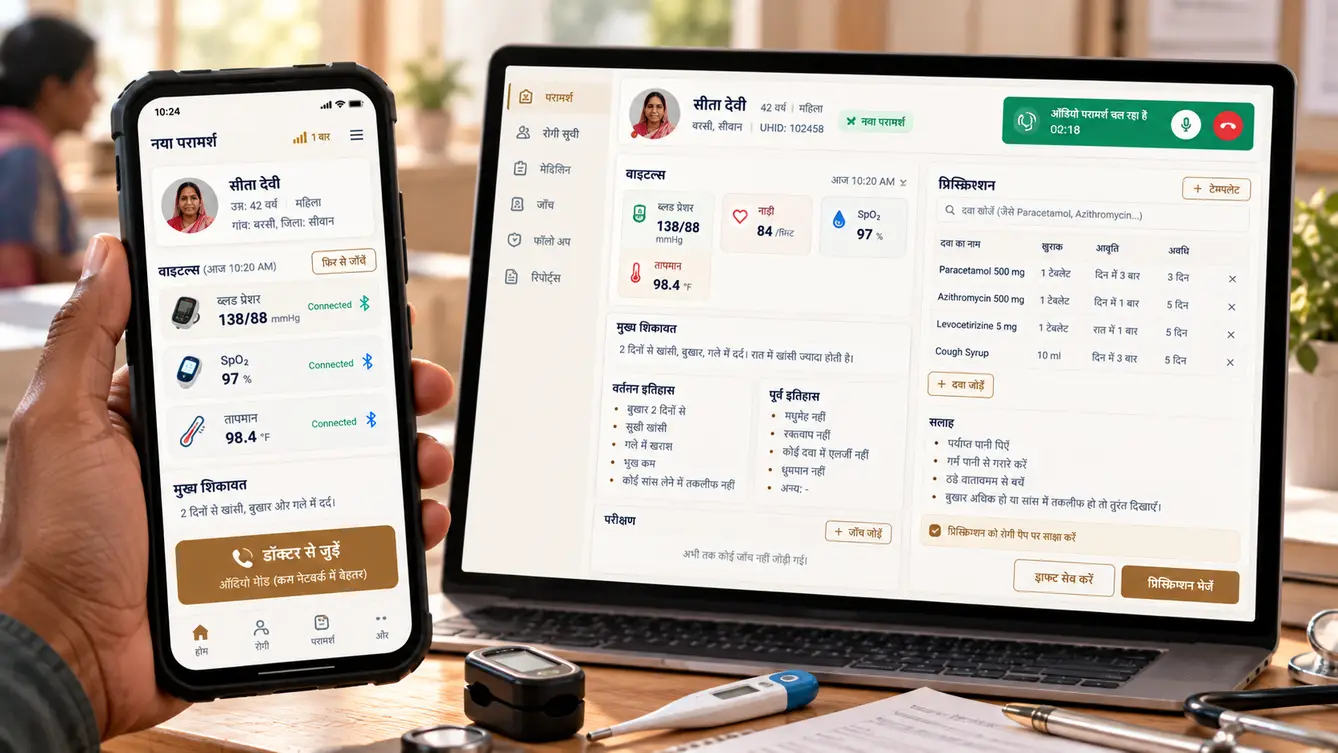
The core idea of Nabz Care is that the consultation does not depend on the call. Before connecting, the health worker records symptoms (by voice, transcribed from Hindi), captures vitals from Bluetooth devices, and takes photos of any visible condition. That packet syncs to the doctor first — it is small and survives weak networks.
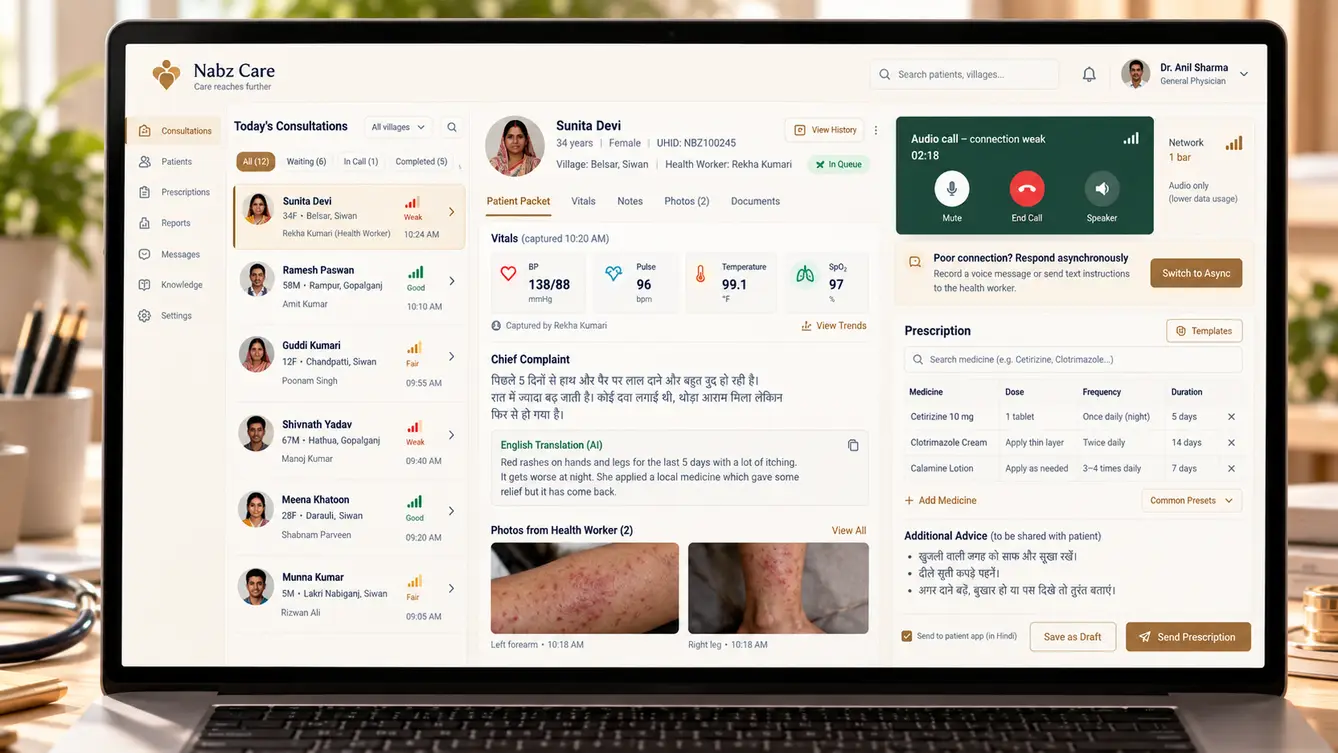
Only then does the call start. It begins as video if the network allows, drops automatically to audio if it does not, and falls back to an asynchronous consult — the doctor reviews the packet and responds with a prescription and advice — if even audio fails. The patient is never left without an outcome.
The team
Native Android was essential for reliable Bluetooth and offline behaviour, so the mobile team was the largest part of the project.
Field research, pilot relaunch and expansion planning.
Hindi-first health-worker app and doctor console.
Offline-first app, Bluetooth devices and adaptive calling.
Doctor console, pharmacy app and operations dashboard.
Sync service, consultation workflow and e-prescriptions.
Hindi speech-to-text and symptom note structuring.
Network simulation, device testing and field testing.
10 people in total, working as one team.
Decisions that made it work
Each decision was tested in the field before being locked in.
Video-first or data-first consultations?
- Video call as the core experience
- Data packet first, then adaptive video, audio or asynchronous consult
Our call: Data packet first, then adaptive video, audio or asynchronous consult. Small data syncs survive weak networks; live video often does not. Sending vitals, notes and photos first meant every consultation could reach an outcome.
Cross-platform or native Android?
- Cross-platform framework
- Native Kotlin Android
Our call: Native Kotlin Android. Reliable Bluetooth device connections, background sync and fine control over calls on entry-level phones were easier and more robust natively. All health workers used Android.
How should health workers record symptoms?
- Typed English forms
- Hindi voice notes transcribed and structured
Our call: Hindi voice notes transcribed and structured. Typing in English was slow and error-prone for most health workers. Speaking in Hindi was natural; transcription and structuring made it useful to the doctor.
Should AI triage patients?
- AI decides urgency
- Rule-based danger signs flagged; doctors decide
Our call: Rule-based danger signs flagged; doctors decide. Clear danger-sign rules, agreed with the medical team, flag urgent cases reliably. Clinical judgement stays with the doctor.
The 26 features
Everything that shipped, for health workers, doctors, pharmacies and the operations team.
- 01Offline patient registration
Register patients and families without a connection.
- 02Hindi voice symptom notes
Speak symptoms; they are transcribed and structured.
- 03Bluetooth vitals
Blood pressure, SpO2, temperature and glucose from connected devices.
- 04Photo capture
Photos of visible conditions attached to the consult.
- 05Danger-sign checklist
Rule-based flags for urgent referral.
- 06Background sync with retries
Data syncs whenever any signal is available.
- 07Adaptive calling
Video, then audio, depending on the live network.
- 08Asynchronous consults
Doctor responds to the packet if a call is not possible.
- 09Doctor queue by urgency
Urgent cases surface first.
- 10Consultation packet view
Vitals, notes and photos before the call starts.
- 11Referral workflow
Referral letters to district hospitals with follow-up tracking.
- 12E-prescriptions
Structured prescriptions sent to the health worker and pharmacy.
- 13Local pharmacy app
Pharmacies receive prescriptions and confirm dispensing.
- 14Printable prescription
Hindi printout for patients via a small printer.
- 15Medicine adherence reminders
Voice call and SMS reminders for patients.
- 16Family health records
Records organised by household.
- 17Visit history
Every consult, vital and prescription over time.
- 18Chronic disease follow-ups
Scheduled follow-ups for diabetes and hypertension.
- 19Health ID linking
Link records with the national digital health ID.
- 20Operations dashboard
Consultations, doctors online and health-worker activity.
- 21Network quality map
Connection quality per village over time.
- 22Doctor rostering
Doctor shifts and availability.
- 23Health-worker performance
Consultations, follow-ups and training status.
- 24Role-based access and audit
Controlled access to records with full logs.
- 25Consent capture
Patient consent recorded before every consult.
- 26Device management
Track and update health-worker phones and devices.
From twenty villages to a hundred
We relaunched in the same twenty villages where the original pilot had failed — deliberately. Health workers who had given up on the old app were the toughest possible test. Within weeks they were completing consultations that previously would have meant a trip to town.
Expansion to a hundred villages followed in waves, each with a two-day training for new health workers run partly by experienced ones from the first wave.
- Weeks 1–3Field research
Two weeks in villages; networks measured, failed pilot analysed.
- Weeks 4–6Design
Hindi-first prototypes tested with health workers in the field.
- Weeks 7–15Build
Native app, sync service, adaptive calling and doctor console.
- Weeks 16–18Relaunch
Same twenty villages as the failed pilot.
- Weeks 19–24Expansion
A hundred villages in waves, with peer-led training.
What we learned
Design for the median connection, not the best one. Separating the data packet from the live call made the product work on the network villages actually have.
The health worker is the product's real user. Every feature that saved them a step or a language barrier improved care more than any feature for doctors.
- Kotlin (Android)
- Next.js
- NestJS
- PostgreSQL
- WebRTC with audio fallback
- Bluetooth medical devices
- Hindi speech-to-text
- AWS Mumbai
