
Crowdline: ticketing and gate entry for concerts where forty thousand people arrive in two hours
A live-events company was tired of ticket touts, fake tickets and gate queues that stretched down the road. We built Crowdline: fair-queue ticket sales, rotating QR tickets that cannot be screenshotted, a gate scanning app that works offline, and real-time crowd dashboards — 25 features for the two hours before the first song.
The night the gates backed up
Crowdline's operations head showed us a video: a queue for a sold-out concert snaking hundreds of metres down the road while the headliner's set had already begun. Gate scanners had lost connectivity when tens of thousands of phones crowded the local network. Staff fell back to eyeballing screenshots, and forged tickets walked straight in.
The ticket sale had its own problems: a website that buckled when sales opened, and bots that bought the best seats within seconds for resale at several times the price.
“Fans forgive a late start. They never forgive standing outside while the band plays.”
Mapping the two critical moments
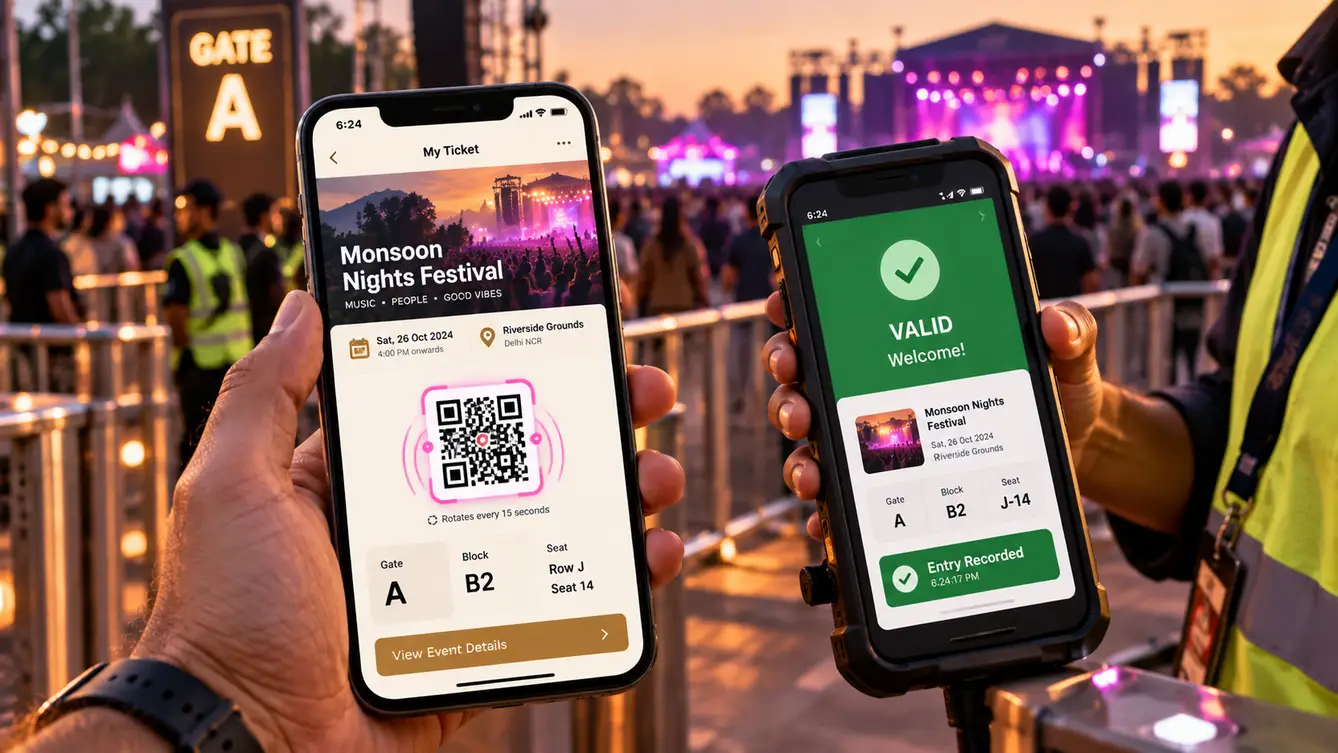
We identified two moments where everything happens at once: the minute sales open, and the two hours before the show starts. Each got its own design. For sales, a virtual waiting room assigns fans a fair position and admits them at a rate the checkout can handle. For entry, gate scanning works entirely offline against a pre-loaded, signed ticket list, syncing admissions between gates whenever any connection is available.

Tickets that cannot be copied
Screenshots were the forgers' main tool, so Crowdline tickets use rotating QR codes: the code changes every few seconds and is signed cryptographically. A screenshot is useless by the time it reaches the gate. Scanners validate signatures offline, so they never need to ask a server whether a ticket is real.
Resale is allowed only through Crowdline's own transfer feature, at face value, which ended the secondary-market mark-ups the organisers hated.
The team
Reliability under extreme load drove the staffing, with an SRE leading both sale-day and show-day readiness.
Operations workshops and event-day readiness.
Fan journey, ticket design and scanner app.
Fan app and offline gate scanner.
Ticketing website and event control dashboard.
Waiting room, ticketing and signed-ticket service.
Sale-day load testing and show-day operations.
8 people in total, working as one team.
Decisions we made
Agreed with the operations and ticketing teams.
How to survive sales opening?
- Scale servers and hope
- Virtual waiting room admitting fans at a sustainable rate
Our call: Virtual waiting room admitting fans at a sustainable rate. A waiting room turns an uncontrolled spike into a steady flow and gives every fan a fair position.
Online or offline gate validation?
- Check each ticket with a server
- Offline validation of signed tickets with gate-to-gate sync
Our call: Offline validation of signed tickets with gate-to-gate sync. Venue networks collapse under crowds. Offline validation kept gates moving regardless.
Static or rotating QR codes?
- Static QR codes
- Rotating, signed QR codes
Our call: Rotating, signed QR codes. Static codes can be screenshotted and resold many times. Rotating codes made copies worthless.
Allow resale?
- Ban all transfers
- Face-value transfers inside Crowdline
Our call: Face-value transfers inside Crowdline. Fans sometimes cannot attend. Face-value transfers helped them while removing touts' profit.
The 25 features
Everything that shipped for fans, gate staff and event control.
- 01Virtual waiting room
Fair queue positions when sales open.
- 02Seat and zone selection
Choose seats or zones with live availability.
- 03Bot protection
Detection and limits against automated buying.
- 04Fast checkout
UPI, cards and wallets.
- 05Purchase limits
Per-account ticket limits.
- 06Rotating QR tickets
Signed codes that change every few seconds.
- 07Face-value transfers
Send tickets to friends safely.
- 08Gate and entry guidance
Assigned gate, map and entry times.
- 09Event updates
Schedule changes and announcements.
- 10Cashless wallet
Top up for food and merchandise.
- 11Offline gate scanning
Validate tickets with no connection.
- 12Gate-to-gate sync
Prevent the same ticket entering twice.
- 13Re-entry rules
Wristband or scan-out rules per event.
- 14Accessibility lanes
Priority entry for accessible tickets.
- 15Live entry dashboard
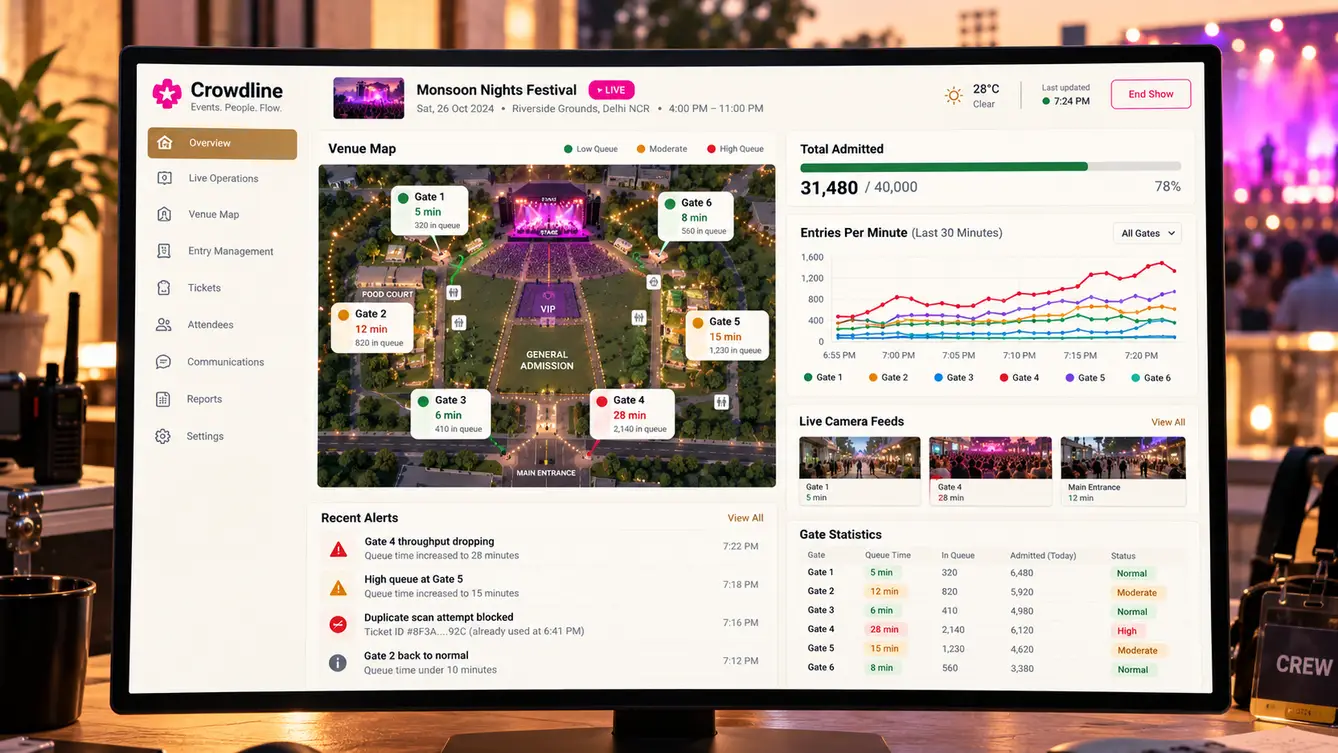
Admissions by gate and minute.
- 16Queue pressure alerts
Alerts when gate throughput drops.
- 17Staff redeployment
Move staff between gates from the dashboard.
- 18Fraud attempt log
Blocked duplicates and invalid tickets.
- 19Capacity tracking
Live headcount against venue capacity.
- 20Sales analytics
Sales by tier, channel and time.
- 21Organiser console
Events, tiers, pricing and inventory.
- 22Role-based access
Organisers, gate staff and control room.
- 23Settlement reports
Revenue and fees reconciled per event.
- 24Load-tested infrastructure
Proven at many times expected traffic.
- 25Incident runbooks
Procedures for sale-day and show-day issues.
The first festival
Crowdline's first event was a two-day festival. Sales opened through the waiting room without the site slowing down, and on both days the gates cleared ahead of the headline acts. Event control moved staff between gates based on live throughput rather than radio calls.
- Weeks 1–2Discovery
Past event failures analysed; venue visits.
- Weeks 3–5Design
Waiting room, rotating tickets and offline scanning.
- Weeks 6–13Build
Ticketing, fan app, scanner and control dashboard.
- Weeks 14–17Load tests and dry runs
Sale-day load tests and a gate dry run with staff.
- Week 18First festival
Two-day festival live on Crowdline.
What we learned
Assume the network will fail at the venue. Offline validation turned the biggest risk into a non-event.
Fairness is a feature fans notice. The waiting room and face-value transfers won goodwill before anyone reached the gate.
- Next.js
- React Native
- Node.js
- PostgreSQL
- Redis virtual queue
- Rotating signed QR codes
- Offline gate sync
- AWS
